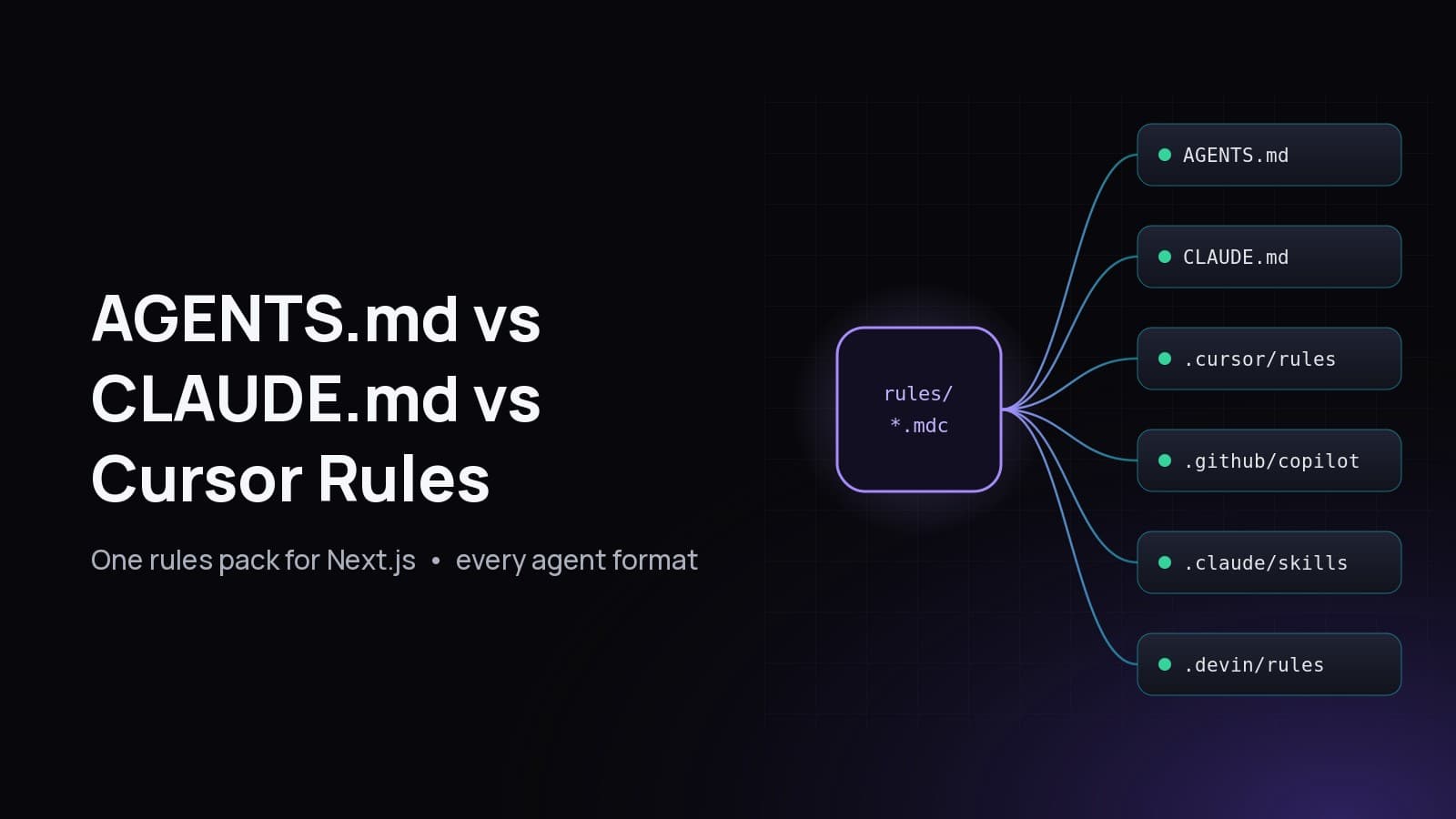
How to Build an MCP Server in Next.js: Streamable HTTP, Auth and Tools
A step-by-step guide to build an MCP server in Next.js with the official v2 TypeScript SDK: an App Router route handler, Streamable HTTP, bearer-token auth, Origin checks and Zod-validated tools.

On this page
- What is an MCP server?
- Why build an MCP server inside a Next.js app?
- stdio vs Streamable HTTP: which MCP transport should you use?
- Which MCP SDK package should you install in 2026?
- How do you build an MCP server in Next.js, step by step?
- Step 1: How do you define MCP tools with registerTool?
- Step 2: How do you add bearer token auth to an MCP server?
- Step 3: How do you mount the MCP handler in a Next.js route handler?
- Step 4: How do you connect Cursor or another client to your MCP server?
- Should you use a static bearer token or OAuth for MCP auth?
- How do you secure an MCP server in production?
- Does an MCP server in Next.js work on Vercel and on a VPS?
- What tools should a portfolio or CMS MCP server expose?
To build an MCP server in Next.js, install the official TypeScript SDK (@modelcontextprotocol/server), register your tools on an McpServer with Zod input schemas, wrap it with createMcpHandler, and export that handler as POST from an App Router route handler such as app/api/mcp/route.ts. Put an Origin check and bearer-token auth in front of it, and any MCP client can call your tools over Streamable HTTP.
This guide builds exactly that, step by step, using the current v2 SDK (version 2.3.1 at the time of writing). It is modelled on the real MCP server behind this site, fabwaseem.com, which lets an AI agent list, create and publish blog posts and portfolio projects through one authenticated endpoint. Every code block below was type-checked and run against the published SDK before this post went out.
What is an MCP server?#
An MCP server is a program that exposes tools, resources and prompts to AI applications through the Model Context Protocol, an open standard. The AI client (ChatGPT, Claude, Cursor, an agent framework) discovers what the server offers and calls it with JSON-RPC messages, so one integration works across every compatible client.
In practice, a tool is a function the model can call (create_post), a resource is data the client can read by URI, and a prompt is a reusable template. Most remote servers start with tools only, and that is what this guide covers.
Why build an MCP server inside a Next.js app?#
Building it inside Next.js means your MCP tools live next to the code they call. The route handler can import the same Prisma client, validation and business logic as your pages and admin, deploys with the app, and shares its domain and HTTPS certificate. You do not run, secure or monitor a second service.
That is the main reason the portfolio server lives at /api/mcp instead of in a separate repo. The tools call the same data layer that powers the blog and admin panel, and revalidate the same pages after a write, so an agent-published post shows up exactly like a hand-published one.
Two things are worth clearing up early, because they are common search confusions:
- "Next.js MCP server" can also mean the Next.js DevTools MCP that lets coding agents inspect your running dev server. That is a different thing. This guide is about building your own MCP server, hosted by your Next.js app, that exposes your app's features as tools.
- You do not need Vercel. A Next.js route handler is a standard
RequesttoResponsefunction, so this runs anywhere Next.js runs, including a VPS. This site, for example, is self-hosted on Coolify; see how to self-host Next.js with Coolify.
stdio vs Streamable HTTP: which MCP transport should you use?#
Use Streamable HTTP for a server hosted in a Next.js app. The MCP specification defines two standard transports: stdio, where the client launches your server as a local child process, and Streamable HTTP, where every message is an HTTP POST to one endpoint. A web app can only do the second.
Quotable facts from the current spec (revision 2026-07-28):
- The server must provide a single HTTP endpoint path that supports POST, for example
https://example.com/mcp(Streamable HTTP transport). - Each request is answered with either a single JSON object or a Server-Sent Events stream scoped to that request.
- Revision 2026-07-28 removed the GET stream endpoint and protocol-level sessions, which makes stateless servers the natural fit.
- The older HTTP+SSE transport from protocol version 2024-11-05 was replaced by Streamable HTTP in 2025-03-26.
Which MCP SDK package should you install in 2026?#
Install @modelcontextprotocol/server. It is v2 of the official MCP TypeScript SDK, the stable line, and implements the 2026-07-28 spec. It replaces the single @modelcontextprotocol/sdk package from v1, which is still published (1.32.x) for existing projects. New servers should start on v2; v1 code needs the upgrade guide.
npm install @modelcontextprotocol/server zodThe SDK depends on Zod 4 (zod ^4.2.0) and you import it as zod/v4. If you are on TypeScript 6 or later, add "types": ["node"] to compilerOptions in tsconfig.json, because the published types reference Buffer.
The v1 to v2 differences you will meet in older tutorials:
How do you build an MCP server in Next.js, step by step?#
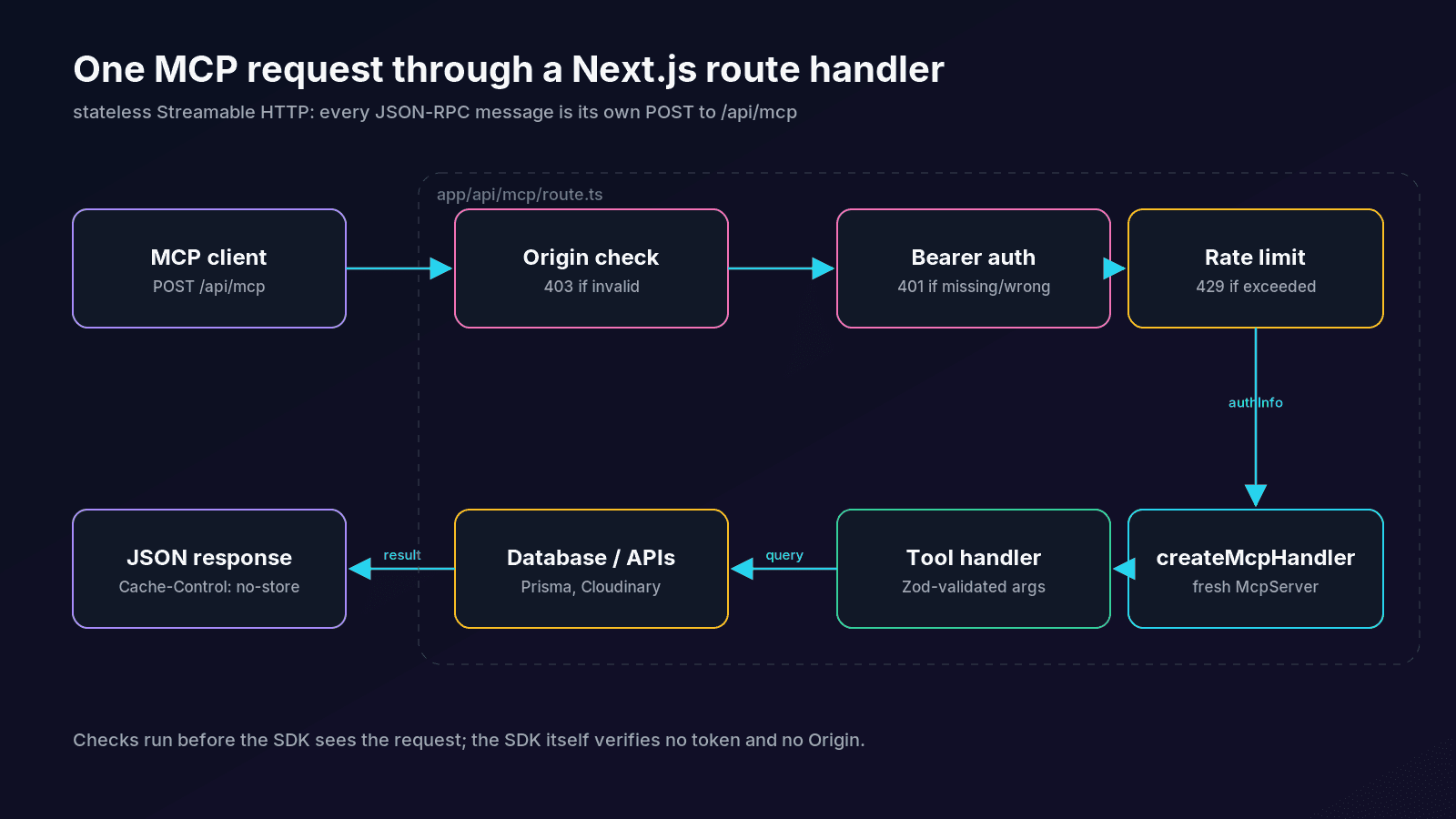
Building an MCP server in Next.js takes five steps: install the SDK, define tools in a server factory, write a bearer-token check, mount the handler in app/api/mcp/route.ts behind Origin and auth checks, then connect a client. The whole thing is three small files.
- Install
@modelcontextprotocol/serverandzod. - Create
lib/mcp/server.tswith a function that returns a freshMcpServerand registers your tools. - Create
lib/mcp/auth.tsto verify theAuthorization: Bearerheader. - Create
app/api/mcp/route.tsthat validates Origin, verifies the token, then callshandler.fetch(request, { authInfo }). - Set
MCP_TOKEN, deploy, and point a client athttps://your-domain/api/mcp.
Step 1: How do you define MCP tools with registerTool?#
Call server.registerTool(name, config, handler). The config holds a title, a description the model reads, a Zod inputSchema, and optional outputSchema and annotations. The SDK turns the Zod schema into the JSON Schema clients see, validates arguments before your handler runs, and infers the handler's types.
// lib/mcp/server.ts
import { McpServer } from "@modelcontextprotocol/server"
import * as z from "zod/v4"

// Stand-in for your data layer (Prisma, Drizzle, a CMS API...).
const posts = [
  { slug: "self-host-nextjs-with-coolify", title: "How to Self-Host Next.js with Coolify", status: "published" },
]

export function createServer() {
  const server = new McpServer({ name: "portfolio", version: "1.0.0" })

  server.registerTool(
    "list_posts",
    {
      title: "List posts",
      description: "List blog posts. Filter by status or a search string.",
      inputSchema: z.object({
        status: z.enum(["draft", "published"]).optional(),
        q: z.string().max(200).optional().describe("Matches title or slug"),
      }),
      annotations: { readOnlyHint: true },
    },
    async ({ status, q }) => {
      const hits = posts.filter(
        (p) =>
          (!status || p.status === status) &&
          (!q || `${p.title} ${p.slug}`.toLowerCase().includes(q.toLowerCase()))
      )
      return { content: [{ type: "text", text: JSON.stringify(hits) }] }
    }
  )

  server.registerTool(
    "create_post",
    {
      title: "Create post",
      description: "Create a draft post. Never publishes.",
      inputSchema: z.object({
        title: z.string().min(8).max(180),
        slug: z.string().regex(/^[a-z0-9]+(?:-[a-z0-9]+)*$/),
        content: z.string().min(1),
      }),
      outputSchema: z.object({ slug: z.string(), status: z.literal("draft") }),
      annotations: { readOnlyHint: false, destructiveHint: false },
    },
    async ({ title, slug }) => {
      if (posts.some((p) => p.slug === slug)) {
        return { content: [{ type: "text", text: `Slug "${slug}" is taken` }], isError: true }
      }
      posts.push({ slug, title, status: "draft" })
      const output = { slug, status: "draft" as const }
      return { content: [{ type: "text", text: JSON.stringify(output) }], structuredContent: output }
    }
  )

  return server
}
A few details that matter more than they look:
- Descriptions are the model's only documentation.
.describe()on a field is carried into the advertised JSON Schema, so spend words there (SDK tools guide). - Bad arguments never reach your code. If a call fails the schema, the SDK returns a tool result with
isError: trueand a readable message, so the model can correct itself and retry. - Return business errors as
isError: trueresults, like the duplicate-slug case above, instead of throwing. The model sees the reason and can pick a new slug. outputSchemaplusstructuredContentgives clients machine-readable output, and the SDK validates it before it leaves your server.- Annotations are hints, not security.
readOnlyHintanddestructiveHinthelp a client decide what to auto-approve, but they never change how the SDK runs the tool. Enforce permissions in your handler.
Step 2: How do you add bearer token auth to an MCP server?#
Verify the token yourself, in front of the SDK. The SDK's HTTP handler validates no token and no Origin header; it only passes through an authInfo object you give it. Read Authorization: Bearer <token>, compare it to a secret in constant time, and return 401 when it is missing or wrong.
// lib/mcp/auth.ts
import { createHash, timingSafeEqual } from "node:crypto"
import type { AuthInfo } from "@modelcontextprotocol/server"

function sameToken(a: string, b: string): boolean {
  // Hash both sides so the comparison is constant time and length-independent.
  const ha = createHash("sha256").update(a).digest()
  const hb = createHash("sha256").update(b).digest()
  return timingSafeEqual(ha, hb)
}

export function verifyBearer(request: Request): AuthInfo | null {
  const expected = process.env.MCP_TOKEN?.trim()
  if (!expected) return null
  const header = request.headers.get("authorization") ?? ""
  const match = /^Bearer\s+(\S+)$/i.exec(header.trim())
  if (!match || !sameToken(match[1], expected)) return null
  return { token: match[1], clientId: "owner", scopes: ["posts:write"] }
}
Hashing both values before timingSafeEqual keeps the comparison constant-time even when the lengths differ, which timingSafeEqual alone would reject with an error. This is the same approach the portfolio server uses. It also treats an unset token as "endpoint disabled" and answers 404, so a missing environment variable can never leave the tools open.
Step 3: How do you mount the MCP handler in a Next.js route handler?#
Create app/api/mcp/route.ts, build the handler once at module scope with createMcpHandler, and export a function as POST that runs the Origin and bearer checks before calling handler.fetch(request, { authInfo }). Next.js route handlers take a web Request and return a Response, which is exactly what the handler expects.
// app/api/mcp/route.ts
import { createMcpHandler, originValidationResponse } from "@modelcontextprotocol/server"
import { verifyBearer } from "@/lib/mcp/auth"
import { createServer } from "@/lib/mcp/server"

export const runtime = "nodejs"
export const dynamic = "force-dynamic"

const handler = createMcpHandler(() => createServer(), { responseMode: "json" })
const ALLOWED_ORIGINS = ["www.example.com", "localhost"]

async function handle(request: Request): Promise<Response> {
  const badOrigin = originValidationResponse(request, ALLOWED_ORIGINS)
  if (badOrigin) return badOrigin

  const authInfo = verifyBearer(request)
  if (!authInfo) {
    return Response.json(
      { error: { code: "UNAUTHORIZED", message: "Invalid or missing bearer token" } },
      { status: 401, headers: { "WWW-Authenticate": 'Bearer realm="mcp"' } }
    )
  }

  const response = await handler.fetch(request, { authInfo })
  const headers = new Headers(response.headers)
  headers.set("Cache-Control", "no-store")
  return new Response(response.body, { status: response.status, headers })
}

export { handle as POST }
Why each line is there:
runtime = "nodejs"because the auth helper usesnode:cryptoand your tools probably use a database driver.dynamic = "force-dynamic"andCache-Control: no-storeso no layer caches a tool result that belongs to one caller.createMcpHandler(() => createServer())runs the factory once per request, so every request gets a freshMcpServerand nothing is shared between callers. The SDK's HTTP guide says to register tools inside the factory, and keep pools and caches at module scope.responseMode: "json"answers with one JSON body. Leave it out if your tools emit progress notifications and you want the SDK to upgrade to an SSE stream.originValidationResponsereturns a403for anOriginthat is not on your list. The spec says servers must validateOriginto prevent DNS rebinding and respond403 Forbiddento an invalid one. Requests with noOriginheader (server-side agents, CLI clients) pass through to the bearer check.
Tested against SDK 2.3.1, this route answers 401 without a token, 403 for Origin: https://evil.com, and 200 with the tool list for a valid token.
Step 4: How do you connect Cursor or another client to your MCP server?#
Give the client the full URL of the route and the bearer header. Most clients that support remote servers accept a URL plus custom headers; for Cursor it is an entry in ~/.cursor/mcp.json. Use the MCP Inspector to call tools by hand before wiring up an agent.
{
  "mcpServers": {
    "portfolio": {
      "url": "https://www.example.com/api/mcp",
      "headers": { "Authorization": "Bearer YOUR_TOKEN" }
    }
  }
}
You can also smoke-test it with plain curl. The Accept header must list both application/json and text/event-stream, because the spec requires clients to accept either:
curl -s https://www.example.com/api/mcp \
  -H "Authorization: Bearer $MCP_TOKEN" \
  -H "Content-Type: application/json" \
  -H "Accept: application/json, text/event-stream" \
  -d '{"jsonrpc":"2.0","id":1,"method":"tools/list","params":{}}'
Should you use a static bearer token or OAuth for MCP auth?#
Use a static bearer token when the only caller is you or your own agents, and OAuth 2.1 when other people's accounts connect. The MCP spec makes authorization optional, but when an HTTP server implements it, it must follow the spec's OAuth 2.1 flow, including Protected Resource Metadata (RFC 9728).
A personal portfolio, where only the owner's agents should publish posts, is the textbook static-token case. If you later open tools to other users, swap verifyBearer for a function that validates JWTs against your identity provider and returns real clientId and scopes; the route shape stays the same, because the handler only ever sees authInfo. Vercel's mcp-handler package wraps this pattern with withMcpAuth and a protected-resource handler if you prefer a ready-made adapter.
How do you secure an MCP server in production?#
Treat every tool as a public API endpoint that an unpredictable caller will hit. Check Origin and auth before the SDK, rate-limit by IP, validate every argument with Zod, keep destructive tools behind an explicit confirm: true, return no secrets in results, and log failures without logging tokens.
The checklist the portfolio server follows:
- Disable the endpoint when the token is unset, instead of failing open.
- Constant-time token comparison, as in
lib/mcp/auth.ts. - Two rate limits: a tight one on failed auth per IP (the portfolio allows 30 failures per 15 minutes) and a looser one on authenticated calls (120 per minute per IP).
- Validate Origin with an allow-list and answer
403. - Destructive tools need confirmation:
delete_postrequiresconfirm: true, so a model cannot delete by accident. - Drafts by default:
create_poststores a draft, and a separatepublish_posttool requires SEO fields and image alt text before anything goes public. - Reject private URLs in tools that fetch remote content (the image-upload tool refuses loopback and private addresses), to avoid server-side request forgery.
no-storeon every response, and generic error messages to the client with details only in server logs.
Does an MCP server in Next.js work on Vercel and on a VPS?#
Yes. The route handler is a stateless web Request to Response function, so it runs on Vercel Functions, a Docker container, or next start on a VPS with no code changes. Because the 2026-07-28 spec dropped protocol sessions, there is no sticky state to share between instances.
The differences are operational. On serverless, set maxDuration high enough for your slowest tool and keep the factory cheap, since it runs per request. On a single VPS, an in-memory rate limiter like the one above works fine; across several instances, move it to Redis. For the cost and trade-off side of that choice, see Coolify vs Vercel for Next.js.
What tools should a portfolio or CMS MCP server expose?#
Expose the same verbs your admin panel has, split into small, clearly described tools: list, get, create, update, publish and delete for each content type, plus helpers like image upload and site info. Small tools with precise schemas are easier for models to choose correctly than one large "do anything" tool.
The portfolio server's tool set, as a reference design:
Every write tool revalidates the affected pages, the sitemap and the feeds, so content published by an agent is live and discoverable without a redeploy.
Questions
Can you build an MCP server with Next.js?
Yes. Next.js App Router route handlers accept a web `Request` and return a `Response`, which is what the official MCP TypeScript SDK's `createMcpHandler` works with. Export the handler as `POST` from `app/api/mcp/route.ts`, add auth in front of it, and MCP clients can connect over Streamable HTTP.
What is the difference between @modelcontextprotocol/sdk and @modelcontextprotocol/server?
`@modelcontextprotocol/server` is v2 of the official TypeScript SDK and implements the 2026-07-28 MCP spec. It replaces the single `@modelcontextprotocol/sdk` package from v1, which is still maintained for existing projects. v2 uses `registerTool` with Zod 4 object schemas and `createMcpHandler` for HTTP.
Does an MCP server need a database or Redis?
No. A stateless Streamable HTTP server keeps nothing between requests, so it needs no session store. Your tools can use whatever data layer the app already has. You only need Redis if you want shared rate limiting or caches across several instances.
How do I test an MCP server locally?
Run `next dev`, then connect the MCP Inspector or your client to `http://localhost:3000/api/mcp` with the bearer header, and call `tools/list` and each tool. You can also send JSON-RPC with `curl`, as long as the `Accept` header lists both `application/json` and `text/event-stream`.
Is a bearer token secure enough for an MCP server?
For a server only you or your own agents use, yes, if the token is long and random, compared in constant time, sent only over HTTPS, and protected by rate limiting on failed attempts. For multi-user access, use OAuth 2.1 as the MCP authorization spec describes, so each user gets scoped, revocable tokens.
Does the MCP endpoint have to be at /api/mcp?
No. `/api/mcp` and `/mcp` are conventions. The spec only requires a single endpoint path that supports POST, so mount it on any route and give clients that full URL.
Share