Next.js SEO for AI Search: How to Get Cited by ChatGPT, Perplexity and AI Overviews
A practical Next.js SEO guide for the AI search era: Metadata API, sitemap.ts, robots.ts for AI crawlers, JSON-LD, llms.txt and a content structure that ChatGPT, Perplexity and Google AI Overviews can cite.

On this page
- What is AI search optimization (GEO and AEO)?
- How do AI answer engines find and cite pages?
- How do you set metadata in the Next.js App Router?
- How do you generate dynamic metadata for blog posts?
- How do you create a sitemap in Next.js?
- How do you allow AI crawlers in robots.txt with Next.js?
- How do you add JSON-LD structured data in Next.js?
- Which schema types matter for a developer blog?
- What is llms.txt and should a Next.js site have one?
- How do you write content that ChatGPT and Perplexity will cite?
- Does page speed or rendering affect AI citations?
- How do you get new pages indexed faster?
- Next.js SEO checklist for AI search
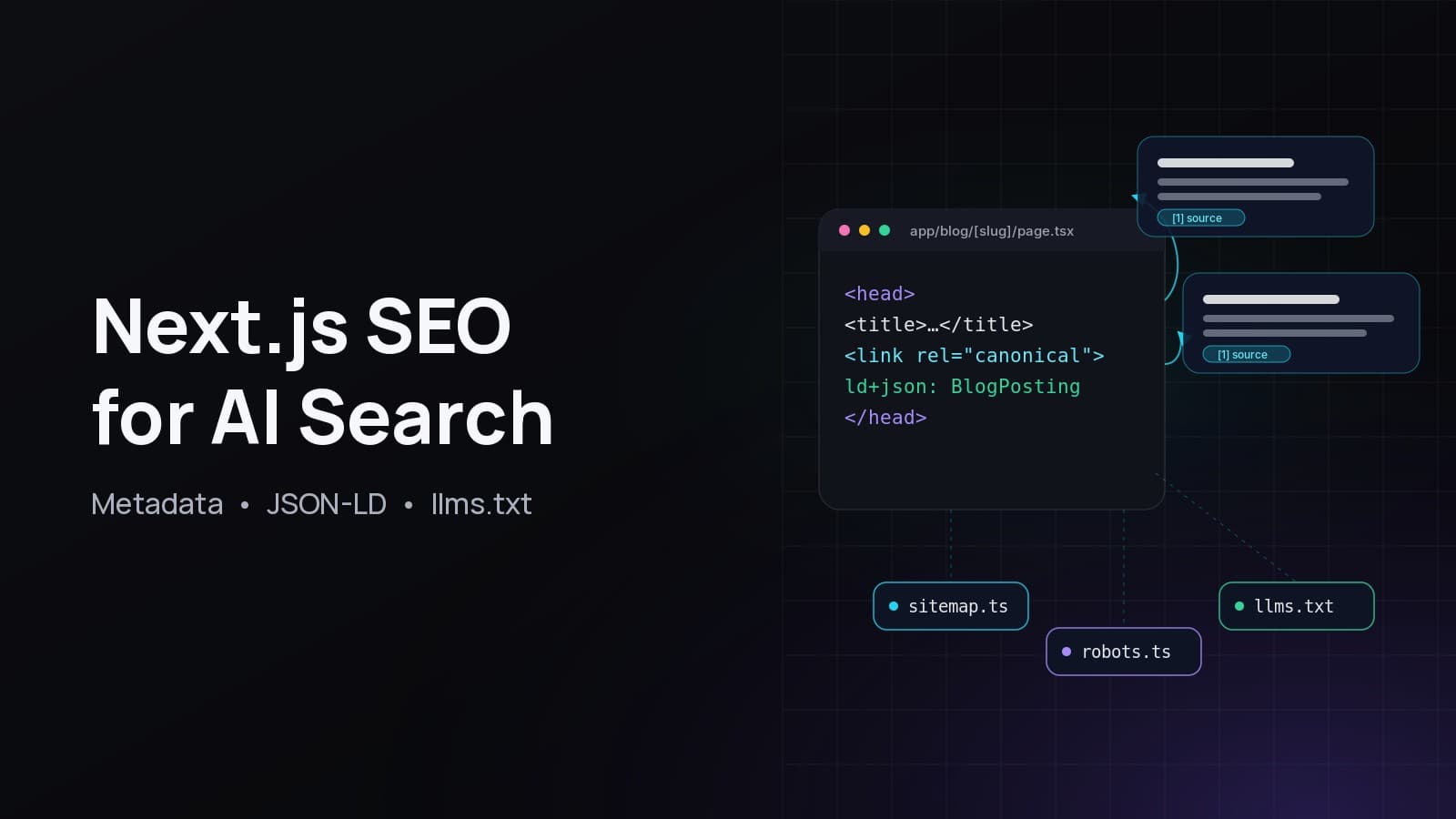
Next.js SEO in 2026 means two audiences at once: classic search crawlers like Googlebot, and AI answer engines like ChatGPT search, Perplexity and Google AI Overviews. The good news is that both reward the same foundations. The App Router gives you a typed Metadata API, file-based sitemap.ts and robots.ts, and server-rendered HTML, so you can ship a site that is easy to crawl, easy to understand and easy to quote.
This guide walks through exactly what this site, fabwaseem.com, implements: per-page metadata with canonical URLs, a dynamic sitemap, a robots.txt that names each AI crawler, JSON-LD for posts and projects, an llms.txt file, and a content structure built around question headings and direct answers. Every code sample targets the current Next.js 16 App Router.
What is AI search optimization (GEO and AEO)?#
Generative engine optimization (GEO), also called answer engine optimization (AEO), is the practice of making your pages easy for AI systems to find, understand and cite when they generate an answer. In practice it is technical SEO plus content written in self-contained, quotable chunks: clear definitions, direct answers, tables and sourced facts.
The terms are newer than the work. Google states plainly that "there are no additional requirements to appear in AI Overviews or AI Mode, nor other special optimizations necessary" (Google Search Central). So GEO is not a separate trick. It is solid SEO, plus a writing style that survives being chopped into a snippet.
How do AI answer engines find and cite pages?#
AI answer engines cite pages they can crawl, index and retrieve for a query. ChatGPT search uses OpenAI's OAI-SearchBot, Perplexity uses PerplexityBot, and Google AI Overviews draw on Google's normal index. If a crawler is blocked, the page cannot render content server-side, or the answer is buried, you are unlikely to be cited.
A few facts from the official documentation are worth knowing:
- To be shown as a supporting link in AI Overviews or AI Mode, "a page must be indexed and eligible to be shown in Google Search with a snippet" (Google Search Central).
- Google AI Overviews and AI Mode "may use a 'query fan-out' technique", issuing multiple related searches across subtopics. That rewards pages that answer many related sub-questions clearly.
- OpenAI documents separate crawlers for search (
OAI-SearchBot), user-triggered fetches (ChatGPT-User) and model training (GPTBot) (OpenAI bots). Perplexity documentsPerplexityBotandPerplexity-User(Perplexity bots).
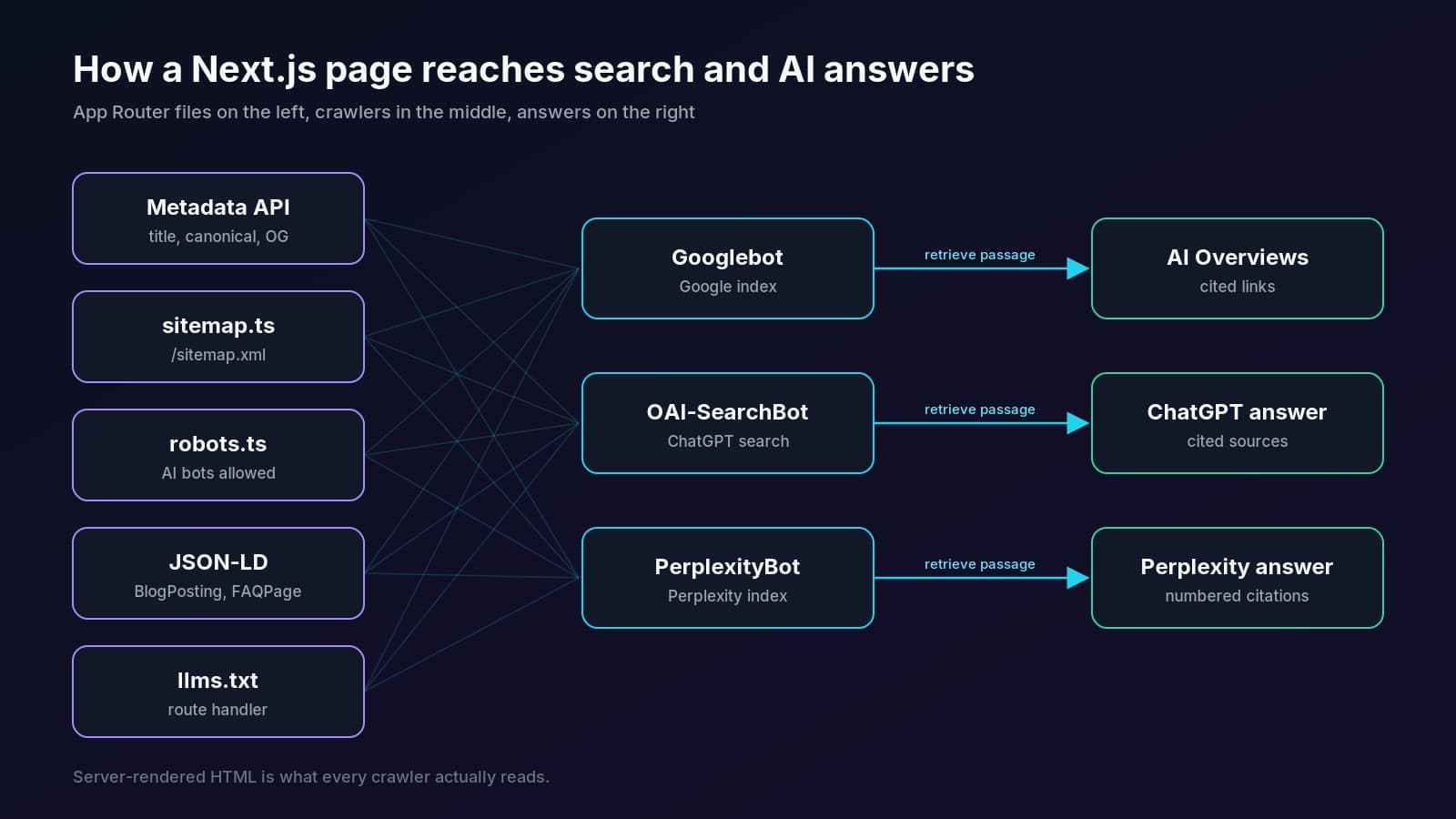
The pipeline is simple: crawlers discover URLs (sitemap and internal links), check permission (robots.txt), fetch HTML (server rendering), understand it (metadata, headings, JSON-LD), and then retrieval systems pick the passage that best answers the question. Each step below maps to one piece of that chain.
How do you set metadata in the Next.js App Router?#
Use the Metadata API: export a static metadata object or an async generateMetadata function from any layout.tsx or page.tsx. Next.js merges it down the route tree and renders the <title>, description, canonical, Open Graph and Twitter tags into server HTML. Set metadataBase once in the root layout so relative URLs resolve to absolute ones (Next.js docs).
Start in the root layout with site-wide defaults and a title template:
// app/layout.tsx
import type { Metadata } from 'next'

export const metadata: Metadata = {
  metadataBase: new URL('https://www.fabwaseem.com'),
  title: {
    default: 'Waseem Anjum: Senior Full Stack Developer',
    template: '%s | Waseem Anjum',
  },
  description:
    'Senior full stack developer building with Next.js, React, Node.js, NestJS and TypeScript.',
  alternates: {
    canonical: '/',
    types: { 'application/rss+xml': '/blog/rss.xml' },
  },
  openGraph: { type: 'website', siteName: 'Waseem Anjum', locale: 'en_US' },
  twitter: { card: 'summary_large_image' },
  robots: { index: true, follow: true },
}

export default function RootLayout({ children }: { children: React.ReactNode }) {
  return (
    <html lang="en">
      <body>{children}</body>
    </html>
  )
}
How do you generate dynamic metadata for blog posts?#
Export generateMetadata from the dynamic route and read params, which is a Promise in current Next.js, so you must await it. Return a per-post title, description, canonical URL and Open Graph article data. Next.js deduplicates the fetch or cached data call, so the page and its metadata share one lookup.
// app/blog/[slug]/page.tsx
import type { Metadata } from 'next'
import { notFound } from 'next/navigation'
import { getPost } from '@/lib/posts'

type Props = { params: Promise<{ slug: string }> }

export async function generateMetadata({ params }: Props): Promise<Metadata> {
  const { slug } = await params
  const post = await getPost(slug)
  if (!post) return {}

  return {
    title: post.seoTitle ?? post.title,
    description: post.seoDescription ?? post.excerpt,
    alternates: { canonical: `/blog/${post.slug}` },
    openGraph: {
      type: 'article',
      title: post.title,
      description: post.excerpt,
      publishedTime: post.publishedAt.toISOString(),
      modifiedTime: post.updatedAt.toISOString(),
      authors: ['Waseem Anjum'],
      images: post.coverImage ? [{ url: post.coverImage, width: 1600, height: 900 }] : [],
    },
  }
}

export default async function PostPage({ params }: Props) {
  const { slug } = await params
  const post = await getPost(slug)
  if (!post) notFound()
  return <article>{/* render post */}</article>
}
On this site, every post page ships exactly one canonical link, index, follow robots meta, and RSS and Atom alternates. You can confirm it on the Coolify vs Vercel post by viewing the source.
How do you create a sitemap in Next.js?#
Add app/sitemap.ts and default-export a function that returns MetadataRoute.Sitemap, an array of URLs with optional lastModified, changeFrequency, priority, images and alternates. Next.js serves it at /sitemap.xml. Because it is a normal async function, you can query your database for every published post and project (Next.js docs).
// app/sitemap.ts
import type { MetadataRoute } from 'next'
import { getPublishedPosts, getPublishedProjects } from '@/lib/content'

const SITE = 'https://www.fabwaseem.com'

export default async function sitemap(): Promise<MetadataRoute.Sitemap> {
  const [posts, projects] = await Promise.all([getPublishedPosts(), getPublishedProjects()])

  return [
    { url: SITE, lastModified: new Date(), images: [`${SITE}/opengraph-image`] },
    { url: `${SITE}/projects`, lastModified: new Date() },
    { url: `${SITE}/blog`, lastModified: new Date() },
    ...projects.map((p) => ({
      url: `${SITE}/projects/${p.slug}`,
      lastModified: p.updatedAt,
    })),
    ...posts.map((post) => ({
      url: `${SITE}/blog/${post.slug}`,
      lastModified: post.updatedAt,
      images: post.coverImage ? [post.coverImage] : undefined,
    })),
  ]
}
Keep lastModified honest. Use the real update time from your database rather than new Date() on every URL, so crawlers can trust it. The live fabwaseem.com sitemap lists the home page, author page, every project page, every post, and the category and tag archives, with image entries where they exist. For more than 50,000 URLs, split it with generateSitemaps.
How do you allow AI crawlers in robots.txt with Next.js?#
Add app/robots.ts returning MetadataRoute.Robots. Give each crawler its own rule when you want different behavior, list your sitemap, and keep private routes like /api/ and /admin disallowed. To be cited by AI search, allow the search crawlers: OAI-SearchBot, ChatGPT-User, PerplexityBot, Perplexity-User and Claude-SearchBot (Next.js docs).
// app/robots.ts
import type { MetadataRoute } from 'next'

const PRIVATE = ['/api/', '/admin', '/admin/']

const AI_SEARCH = [
  'OAI-SearchBot', 'ChatGPT-User',
  'PerplexityBot', 'Perplexity-User',
  'Claude-SearchBot', 'Claude-User',
]
const AI_TRAINING = ['GPTBot', 'ClaudeBot', 'Google-Extended', 'Applebot-Extended', 'CCBot']
const BLOCKED = ['Bytespider']

export default function robots(): MetadataRoute.Robots {
  return {
    rules: [
      { userAgent: '*', allow: '/', disallow: PRIVATE },
      ...[...AI_SEARCH, ...AI_TRAINING].map((userAgent) => ({
        userAgent,
        allow: '/',
        disallow: PRIVATE,
      })),
      ...BLOCKED.map((userAgent) => ({ userAgent, disallow: '/' })),
    ],
    sitemap: 'https://www.fabwaseem.com/sitemap.xml',
  }
}
Which crawlers should you allow? It depends on whether you want visibility, training use, or both:
Two details trip people up. First, blocking Google-Extended does not remove you from AI Overviews; Google says robots directives for Googlebot are the control for Search, and you limit snippets with nosnippet, max-snippet or noindex (Google Search Central). Second, robots.txt is only half the story: a CDN or firewall bot rule that challenges these crawlers blocks them just as effectively, and Google explicitly lists checking "any CDN or hosting infrastructure" as a best practice.
How do you add JSON-LD structured data in Next.js?#
Render a native <script type="application/ld+json"> tag inside your page.tsx or layout.tsx, with the object passed through JSON.stringify and < replaced by \u003c to prevent XSS. The Next.js docs recommend this exact pattern and note that next/script is not needed because JSON-LD is data, not executable code (Next.js docs).
A small reusable component keeps every page consistent:
// components/json-ld.tsx
import type { Thing, WithContext } from 'schema-dts'

export function JsonLd<T extends Thing>({ data }: { data: WithContext<T> }) {
  return (
    <script
      type="application/ld+json"
      dangerouslySetInnerHTML={{
        __html: JSON.stringify(data).replace(/</g, '\\u003c'),
      }}
    />
  )
}
Then build a BlogPosting from the same record that renders the page, so the markup always matches the visible text:
// app/blog/[slug]/page.tsx (inside PostPage)
import type { BlogPosting, WithContext } from 'schema-dts'
import { JsonLd } from '@/components/json-ld'

const url = `https://www.fabwaseem.com/blog/${post.slug}`
const blogPosting: WithContext<BlogPosting> = {
  '@context': 'https://schema.org',
  '@type': 'BlogPosting',
  headline: post.title,
  description: post.excerpt,
  image: post.coverImage ?? undefined,
  datePublished: post.publishedAt.toISOString(),
  dateModified: post.updatedAt.toISOString(),
  mainEntityOfPage: url,
  url,
  author: {
    '@type': 'Person',
    name: 'Waseem Anjum',
    url: 'https://www.fabwaseem.com/author/waseem-anjum',
  },
  keywords: post.tags.map((t) => t.name).join(', '),
}

return (
  <article>
    <JsonLd data={blogPosting} />
    {/* ... */}
  </article>
)
Which schema types matter for a developer blog?#
Each post on this site emits BlogPosting (also typed TechArticle), BreadcrumbList and FAQPage, and tutorial posts add HowTo. Project pages describe each project as a SoftwareApplication with breadcrumbs, and the author page uses Person. Google says structured data helps it "understand the content of the page" (Google Search Central).
Be realistic about rich results. Since 2023 Google only shows FAQ rich results for well-known, authoritative government and health sites (FAQPage docs). FAQ markup is still useful because it labels question and answer pairs cleanly for any parser, but do not expect the expandable FAQ snippet on a personal blog. Google's AI features page also says there's "no special schema.org structured data that you need to add" for AI Overviews, so treat JSON-LD as clarity, not a ranking switch.
What is llms.txt and should a Next.js site have one?#
llms.txt is a proposed standard: a Markdown file at /llms.txt that gives language models a concise summary of your site and links to the most useful pages. The spec asks for an H1 with the site name, a blockquote summary, then sections of links (llmstxt.org). It is cheap to add, but Google says it does not need it for AI features.
That second point matters for setting expectations. Google states: "You don't need to create new machine readable files, AI text files, or markup to appear in these features" (Google Search Central). So llms.txt will not help with AI Overviews. It is useful for coding assistants and agents that fetch it directly, and the Next.js docs themselves publish one. This site serves both a short llms.txt and an expanded llms-full.txt generated from the same database as the pages.
In the App Router, a route handler builds it at request time:
// app/llms.txt/route.ts
import { getPublishedPosts, getPublishedProjects } from '@/lib/content'

const SITE = 'https://www.fabwaseem.com'

export const revalidate = 3600

export async function GET() {
  const [posts, projects] = await Promise.all([getPublishedPosts(), getPublishedProjects()])

  const body = [
    '# Waseem Anjum',
    '',
    '> Senior full stack developer building with Next.js, React, Node.js, NestJS and TypeScript.',
    '',
    '## Projects',
    ...projects.map((p) => `- [${p.name}](${SITE}/projects/${p.slug}): ${p.summary}`),
    '',
    '## Blog',
    ...posts.map((p) => `- [${p.title}](${SITE}/blog/${p.slug}): ${p.excerpt}`),
    '',
    '## Optional',
    `- [Full context](${SITE}/llms-full.txt)`,
  ].join('\n')

  return new Response(body, {
    headers: { 'Content-Type': 'text/plain; charset=utf-8' },
  })
}
How do you write content that ChatGPT and Perplexity will cite?#
Write in self-contained passages that answer one question each. Phrase headings as the questions people ask, put a 40 to 60 word direct answer right under each heading, define terms in one sentence, and back claims with links to primary sources. Retrieval systems pull passages, not whole pages, so every section should make sense on its own.
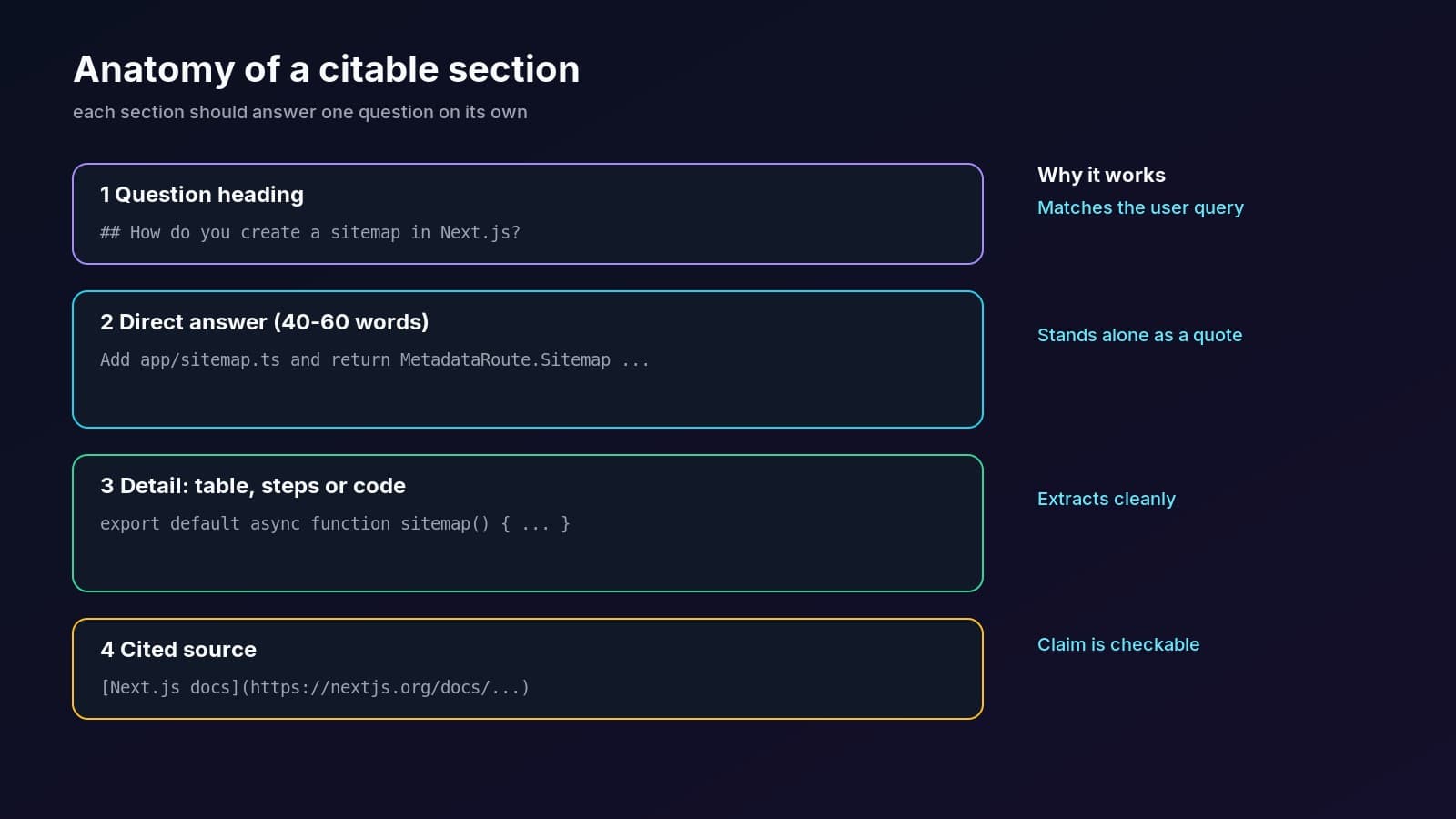
This is the structure every post on this blog follows:
- Lead with a definition. The first two sentences say what the thing is and who it's for. It gives engines a sentence that stands on its own.
- Use question headings. Match the wording people type or say, such as "How do you create a sitemap in Next.js?". Query fan-out means engines look for answers to many sub-questions.
- Answer first, explain second. One short paragraph that fully answers the heading, then detail, code and caveats.
- Prefer tables and numbered steps. Comparisons and procedures extract cleanly into generated answers.
- Cite primary sources inline. Link the official docs for every factual claim. It shows the claim is checkable and helps readers.
- Never invent numbers. If you can't source a statistic, leave it out. Made-up stats are the fastest way to lose trust.
- Show who wrote it. A real author with a profile page and
Personmarkup supports Google's guidance on helpful, people-first content. - Add a TL;DR, key takeaways and FAQs. They give engines short, quotable summaries that match how people ask.
Does page speed or rendering affect AI citations?#
Yes, indirectly. Many AI crawlers don't run JavaScript the way a browser does, so content that only appears after client-side rendering may be invisible to them. Server Components render your article to HTML on the server by default, which is one of the strongest reasons to build content sites on the App Router.
Keep the article body in Server Components and reserve 'use client' for interactive pieces such as a share button or theme switcher. Check what crawlers see with curl https://your-site.com/blog/post | grep "<h2". If your headings aren't in the raw HTML, fix that before anything else.
How do you get new pages indexed faster?#
Submit your sitemap in Google Search Console and Bing Webmaster Tools, link new posts from existing pages, and ping IndexNow when you publish. IndexNow is a protocol supported by Bing and other engines that lets you notify them of changed URLs with one request (IndexNow docs). It takes one request per publish, so it's worth the small effort.
// lib/indexnow.ts
export async function pingIndexNow(urls: string[]) {
  const key = process.env.INDEXNOW_KEY!
  const res = await fetch('https://api.indexnow.org/indexnow', {
    method: 'POST',
    headers: { 'Content-Type': 'application/json; charset=utf-8' },
    body: JSON.stringify({
      host: 'www.fabwaseem.com',
      key,
      keyLocation: `https://www.fabwaseem.com/${key}.txt`,
      urlList: urls,
    }),
  })
  return res.ok
}
Also publish an RSS or Atom feed (this blog serves /blog/rss.xml and /blog/atom.xml) so aggregators and feed-reading agents pick up new posts quickly. Hosting matters less than people think: this site self-hosts on a VPS with Coolify, covered in how to self-host Next.js with Coolify, and every feature here works the same on a single next start server.
Next.js SEO checklist for AI search#
Use this as a pre-launch checklist. Every item is something fabwaseem.com ships today.
If you're still choosing where to host, the trade-offs are in Coolify vs Vercel for Next.js. SEO works equally well on either.
Questions
Is Next.js good for SEO?
Yes. The App Router renders pages on the server by default, so crawlers receive full HTML without running JavaScript. It also has a built-in Metadata API for titles, descriptions, canonicals and Open Graph tags, plus file conventions for sitemap.xml, robots.txt and Open Graph images. Good SEO still depends on your content and internal linking.
Do I need llms.txt to appear in ChatGPT or Google AI Overviews?
No. Google says you don't need new machine-readable files, AI text files or special markup to appear in AI Overviews or AI Mode. llms.txt is a proposed standard that some agents and coding assistants read directly. It's cheap to add as a route handler, but treat it as a bonus, not a ranking factor.
Which robots.txt user agents control ChatGPT and Perplexity?
OpenAI uses OAI-SearchBot for ChatGPT search, ChatGPT-User for pages fetched during a conversation and GPTBot for training. Perplexity uses PerplexityBot for its index and Perplexity-User for user-triggered fetches. To be cited in their answers, allow the search and user agents; blocking GPTBot only affects training.
Does blocking Google-Extended remove my site from AI Overviews?
No. Google-Extended controls use in Gemini training and grounding in some other Google systems, not Search. AI Overviews and AI Mode are part of Search, so they follow Googlebot's robots rules. To limit what appears, use nosnippet, data-nosnippet, max-snippet or noindex on the page.
How do I add JSON-LD in the Next.js App Router?
Render a script tag with type application/ld+json inside page.tsx or layout.tsx, and pass the object through JSON.stringify with every < replaced by \u003c to prevent XSS. The Next.js docs recommend a native script tag rather than next/script. You can type the object with the schema-dts package.
Does FAQ schema still help SEO in 2026?
FAQ rich results are now limited to well-known, authoritative government and health websites, so most blogs won't get the expandable FAQ snippet. FAQPage markup is still valid structured data that labels question and answer pairs clearly, and visible FAQs written as real questions give AI engines short, quotable answers.
Share