AGENTS.md vs CLAUDE.md vs Cursor Rules: A Next.js Guide with a Free Rules Pack
AGENTS.md vs CLAUDE.md vs Cursor rules vs Copilot instructions: what each file does, which agent reads it, real Next.js rule examples, and a free open-source rules pack.

On this page
- What is AGENTS.md?
- What is CLAUDE.md?
- Does Claude Code read AGENTS.md?
- AGENTS.md vs CLAUDE.md vs Cursor rules vs Copilot instructions: what is the difference?
- How do Cursor rules work in a Next.js project?
- What should go in AGENTS.md for a Next.js app?
- How do GitHub Copilot instructions differ?
- When should you use a Claude Code skill instead of a rule?
- What is agent-rules and what does it include?
- How do you install the rules into your project?
- Should you keep one file or several?
- Key takeaways
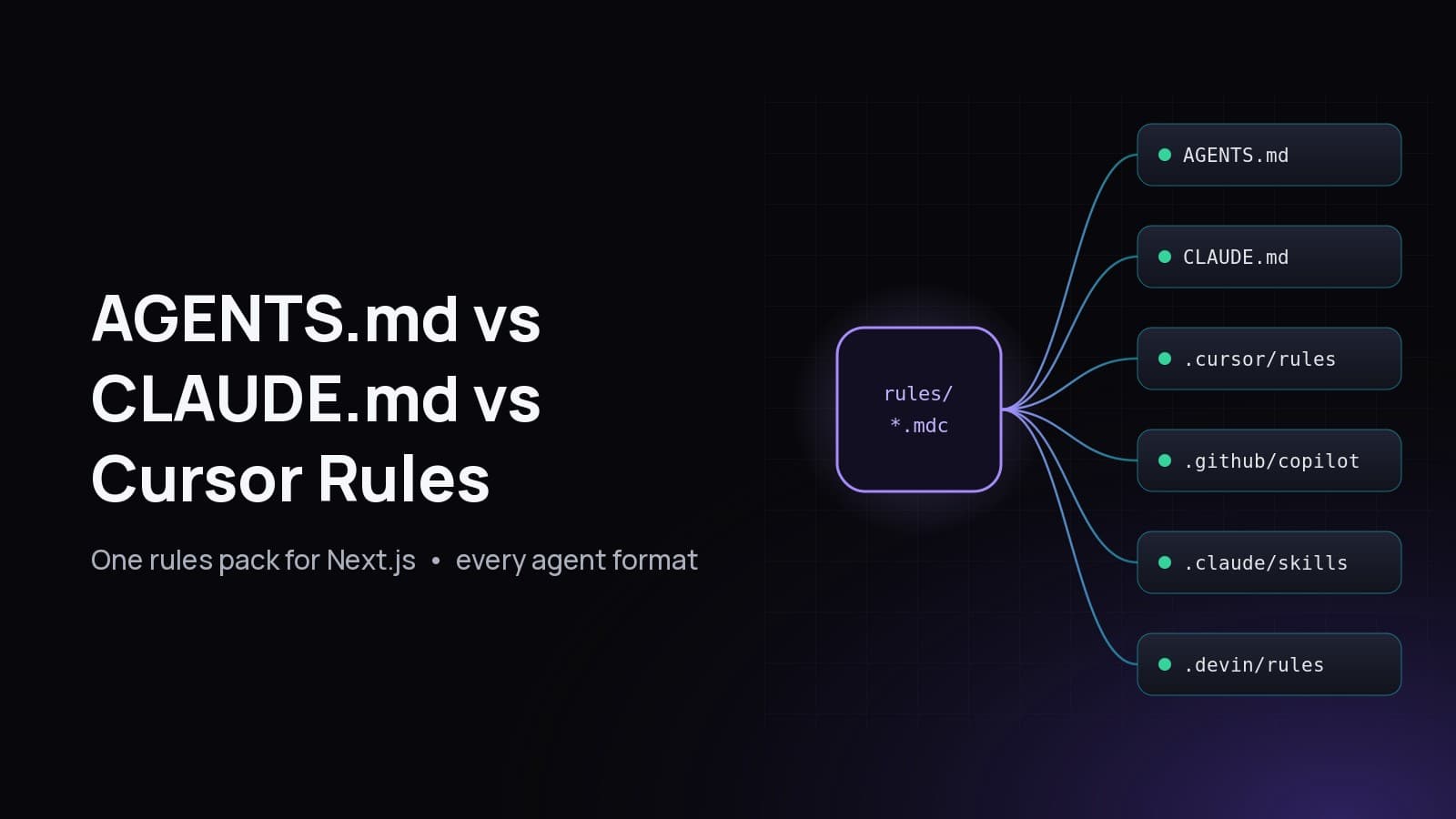
AGENTS.md vs CLAUDE.md comes down to scope: AGENTS.md is an open, tool-neutral Markdown file that many coding agents read, while CLAUDE.md is Claude Code's own project memory file. Cursor rules (.cursor/rules/*.mdc) and GitHub Copilot instructions (.github/copilot-instructions.md) are tool-specific formats that add scoping by file pattern. Most Next.js teams need more than one of them.
Free and open source: I packaged production rules for Next.js, TypeScript, React, Node.js, NestJS, Prisma, Drizzle, Tailwind CSS and shadcn/ui into one repo that renders every format from a single source. Get it here: github.com/fabwaseem/agent-rules (MIT).
This guide explains what each file does, which agent reads which file, how they interact (Claude Code has specific rules for when it reads AGENTS.md), and gives you real rule snippets you can copy. Everything below was checked against the official docs linked in each section.
What is AGENTS.md?#
AGENTS.md is a plain Markdown file at the root of a repository that tells AI coding agents how to work in that codebase: build and test commands, conventions, and things to avoid. It has no required fields or frontmatter. Agents read the nearest AGENTS.md in the directory tree, so a nested file in a subproject takes precedence over the root one.
The format is documented at agents.md, which describes it as "a simple, open format for guiding coding agents" used by more than 60,000 open-source projects. Think of it as a README for agents: the README is for humans, AGENTS.md is for the tool that edits your code.
A minimal example:
# AGENTS.md

## Workspace
- Package manager: `pnpm`. Do not add a second lockfile.
- Run `pnpm test` and `pnpm typecheck` before you finish.
- Do not hand-edit generated output (`dist/`, `.next/`, generated database clients).
What is CLAUDE.md?#
CLAUDE.md is the project instructions file for Claude Code. Claude reads it at the start of every session from ./CLAUDE.md or ./.claude/CLAUDE.md, plus your personal ~/.claude/CLAUDE.md. It is plain Markdown, can import other files with @path/to/file, and Anthropic recommends keeping each file under 200 lines because longer files cost context and reduce adherence.
Those details come straight from the Claude Code memory docs. Two things matter most in practice:
- Imports. A line like
@AGENTS.mdinCLAUDE.mdpulls that file into context at launch, up to four hops deep. This is how you share one source of truth between Claude and every other agent. - Instructions are context, not enforcement. The docs say so directly: to block an action no matter what, use a hook, not a sentence in
CLAUDE.md.
Does Claude Code read AGENTS.md?#
Yes, but only in one situation by default. Claude Code reads AGENTS.md as project instructions when there is no CLAUDE.md, .claude/CLAUDE.md or CLAUDE.local.md in your working directory or above it. If a CLAUDE.md exists, Claude reads only the CLAUDE.md files, unless that file imports AGENTS.md or you change the Project instructions setting.
Here is the behavior from the official docs, summarized:
Reading AGENTS.md directly also needs a recent Claude Code version (v2.1.277 or later per the docs). The safest setup for a mixed team is a short CLAUDE.md that imports AGENTS.md and adds only Claude-specific notes. That is exactly what the agent-rules installer writes.
AGENTS.md vs CLAUDE.md vs Cursor rules vs Copilot instructions: what is the difference?#
They differ in who reads them and how they are scoped. AGENTS.md is shared by many agents and scoped by directory. CLAUDE.md is Claude Code only. Cursor .mdc rules can attach to specific file globs or load when the agent judges them relevant. Copilot path instructions use an applyTo glob. Use AGENTS.md for shared rules and the others for targeted ones.
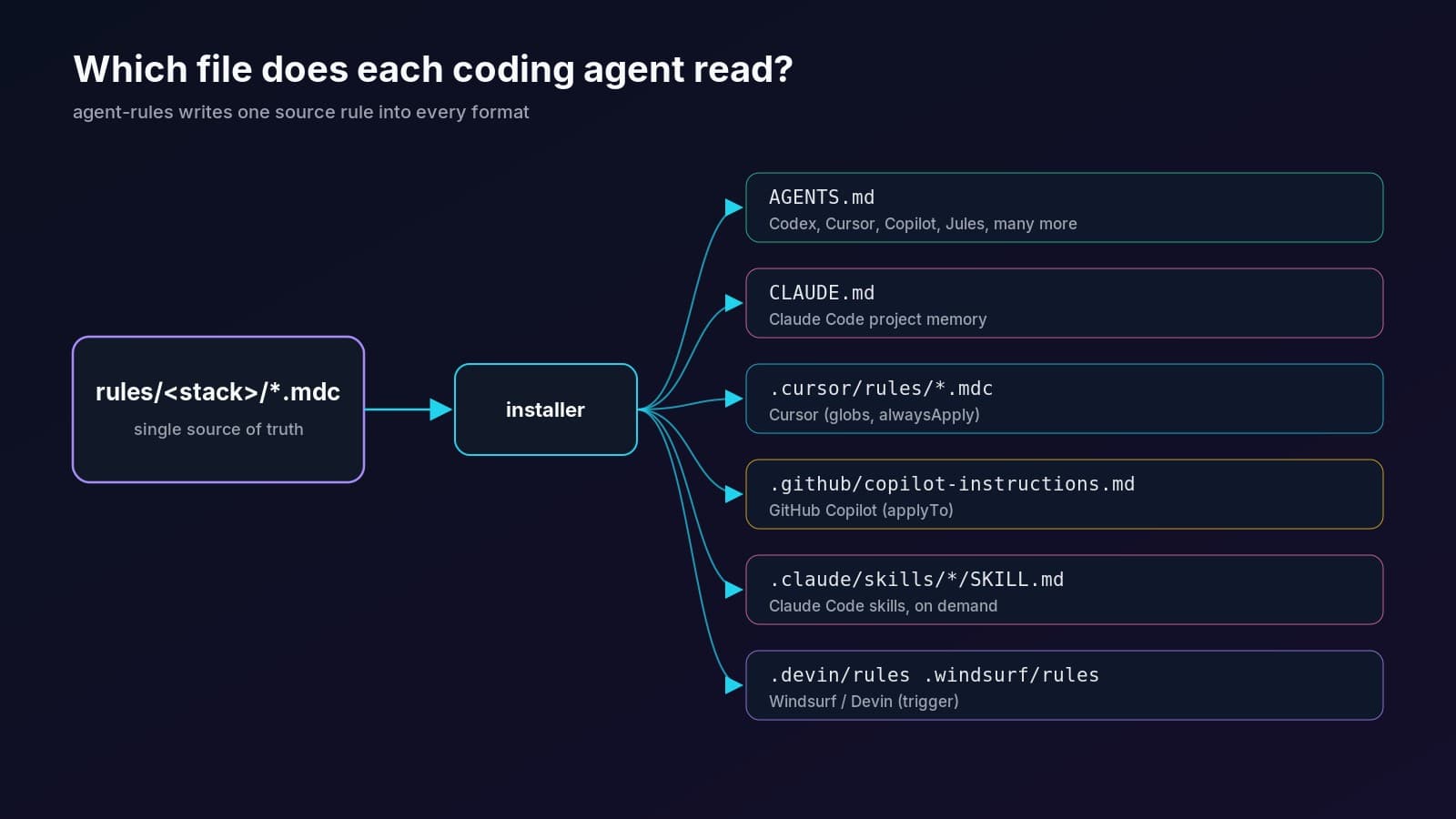
Sources: agents.md, Cursor Rules docs, Claude Code memory, Claude Code skills, GitHub Copilot repository instructions and Windsurf / Devin rules.
How do Cursor rules work in a Next.js project?#
Cursor reads .mdc files from .cursor/rules/, and the frontmatter decides when each rule loads. alwaysApply: true includes it every session. alwaysApply: false with globs attaches it when a matching file is in context. A description with no globs lets the agent pull it in when relevant. With neither, it loads only when you @ mention it.
One gotcha: Cursor ignores a plain .md file inside .cursor/rules/. The extension must be .mdc. Here is the real App Router rule from the repo, trimmed:
---
description: "Next.js App Router structure, Server Components, routing files, and proxy.ts."
globs: "app/**/*.ts,app/**/*.tsx,src/app/**/*.ts,src/app/**/*.tsx,next.config.*,proxy.ts,middleware.ts"
alwaysApply: false
---

# Next.js App Router

- New UI goes in the App Router. Do not add a `pages/` route.
- Components are Server Components by default. Add `"use client"` only on the leaf
  that needs state, effects, or browser APIs.
- Read `params` and `searchParams` as promises and `await` them.
- Set document metadata with the Metadata API. Do not add `next/head`.
- Import `server-only` in modules that read secrets or talk to the database.
- On Next.js 16, request interception lives in `proxy.ts` and exports `proxy`.
- Do not flip `cacheComponents` on as a drive-by.
Because it has globs, this rule costs nothing when you are editing a Prisma schema or a README. That is the main advantage of Cursor rules over one giant AGENTS.md.
What should go in AGENTS.md for a Next.js app?#
Put the things every agent must know in every session: the package manager and scripts, how to run tests and typecheck, which folders are generated, and short, specific conventions. Keep stack details that only matter for some files in scoped rules. Short and concrete beats long and vague, because agents follow specific instructions more reliably.
A good checklist for a Next.js AGENTS.md:
- Commands: install, dev, test, typecheck, lint, build.
- Package manager: one, named explicitly, with "do not add a second lockfile".
- Generated paths:
.next/,dist/, coverage, Prisma client. - Conventions: Server Components by default, Zod validation at boundaries, server actions that authorize inside the action.
- Git: commit format and what not to do (no force-push on shared branches).
- Definition of done: tests pass, types check, no new warnings.
Avoid generic advice like "write clean code". It costs tokens and changes nothing.
How do GitHub Copilot instructions differ?#
Copilot uses a repo-wide .github/copilot-instructions.md plus optional path-specific files in .github/instructions/ that end in .instructions.md and declare an applyTo glob. Copilot Chat, code review and the Copilot coding agent read them. Copilot also reads AGENTS.md files, with the nearest one taking precedence, but applyTo files are how you scope rules to certain paths.
A real path-specific file from the repo's NestJS example:
---
applyTo: "**/*.controller.ts,**/*.service.ts,**/*.module.ts,**/*.guard.ts,**/*.dto.ts"
---

# NestJS

- A feature is a module: `*.module.ts`, a controller, a service, and DTOs.
- Controllers translate HTTP. Services hold business rules. A controller does
  not import Prisma or Drizzle directly.
- Do not read `process.env` inside a service. Inject `ConfigService`.
- Authentication is a guard. Resource authorization happens in the service.
When should you use a Claude Code skill instead of a rule?#
Use a rule for a constraint and a skill for a procedure. A rule says "never do X in these files". A skill is a step-by-step workflow, like making a commit or adding a server action, that Claude loads only when its description matches the task or when you type /name. Skills live in .claude/skills/<name>/SKILL.md with name and description frontmatter.
Per the skills docs, name is lowercase letters, numbers and hyphens. Here is the commit skill from the pack:
---
name: git-commit
description: Use when creating a git commit or pull request and the change should follow this repository's commit conventions.
---

# Commit a change

1. Inspect `git status` and `git diff`. Stage only the files that belong to this change.
2. Run typecheck and the tests that cover the change. Do not commit a known failure.
3. Write a Conventional Commit subject: `type(scope): imperative summary`.
4. Do not add `Co-authored-by` or other trailers unless the user asked.
5. Do not amend or force-push a commit that is already on a remote.
What is agent-rules and what does it include?#
agent-rules is an MIT-licensed pack of production rules for AI coding agents, written once as .mdc source files and rendered into AGENTS.md, CLAUDE.md, Cursor rules, Copilot instructions, Claude Code skills and Windsurf/Devin rules. You pick the stacks you use, and the installer writes only those, so the formats never drift apart.
Stacks covered:
It also ships 12 Claude Code skills (commit, add tests, security review, accessibility pass, Next.js server action, Next.js cache, React component, Node service, Prisma change, Drizzle change, NestJS feature and shadcn compose) and two committed examples: a Next.js SaaS setup and a NestJS API.
How do you install the rules into your project?#
Clone the repo, build the installer and point it at your project. It detects your stacks from package.json and components.json, asks you to confirm, then writes each format. Re-running updates only its own marked blocks in AGENTS.md, CLAUDE.md and copilot-instructions.md, so text you wrote outside them stays.
git clone https://github.com/fabwaseem/agent-rules.git
cd agent-rules && npm install && npm run build

# preview what would be written
node dist/cli.js --target ../my-next-app --dry-run

# install chosen stacks and formats
node dist/cli.js --target ../my-next-app \
  --stacks core,nextjs,react,prisma,tailwind,shadcn \
  --agents agents,claude,cursor,copilot
Prefer no tooling? Copy files by hand from examples/nextjs-saas: take AGENTS.md, CLAUDE.md, .cursor/rules/, .github/ and .claude/skills/ and drop them into your repo. An npx one-liner is coming soon once the package is published to npm.
The installer needs Node.js 20.19 or later. It also includes a validate command that checks Cursor frontmatter keys, Copilot applyTo, skill names and Windsurf triggers, including the 12,000-character Windsurf workspace rule limit.
Should you keep one file or several?#
Keep one shared source and generate the rest. Hand-maintaining five formats means they drift: someone updates Cursor rules and forgets AGENTS.md. A single AGENTS.md plus a CLAUDE.md that imports it works for small repos. Larger repos benefit from glob-scoped Cursor and Copilot files so each conversation only carries relevant rules.
If you run your own agent tooling, the same idea applies to servers too. I wrote about exposing tools to agents in How to Build an MCP Server in Next.js, and about getting content cited by AI engines in Next.js SEO for AI Search. You can see more of what I build on the projects page.
Key takeaways#
AGENTS.mdis the open, shared format. Use it for rules every agent should follow.- Claude Code reads
AGENTS.mdonly when noCLAUDE.mdexists, so add@AGENTS.mdto yourCLAUDE.mdif you keep both. - Cursor needs
.mdcfiles in.cursor/rules/, and globs keep rules out of unrelated conversations. - Copilot path rules use
.instructions.mdfiles with anapplyToglob. - Generate every format from one source so they never drift. agent-rules does this for the Next.js and TypeScript stack.
Questions
Is AGENTS.md the same as CLAUDE.md?
No. AGENTS.md is an open format many coding agents read. CLAUDE.md is Claude Code's own project instructions file. Claude Code reads AGENTS.md only when no CLAUDE.md exists, so teams usually keep a short CLAUDE.md that imports AGENTS.md with an @AGENTS.md line.
Can I use AGENTS.md with Cursor?
Yes. Cursor supports AGENTS.md as plain project instructions. For rules that should apply only to certain files, use .mdc files in .cursor/rules/ with a globs pattern, which Cursor attaches only when matching files are in context.
Why is my Cursor rule not loading?
The most common cause is the file extension. Cursor ignores .md files in .cursor/rules/; they must be .mdc. Also check the frontmatter: a rule with alwaysApply false and no globs or description only loads when you @ mention it.
Does GitHub Copilot read AGENTS.md?
Yes. GitHub's docs say you can store AGENTS.md files anywhere in a repository and the nearest one takes precedence. Copilot also reads .github/copilot-instructions.md and path-specific .instructions.md files with an applyTo glob.
How long should AGENTS.md or CLAUDE.md be?
Short. Anthropic recommends under 200 lines per CLAUDE.md because longer files cost context and reduce adherence. Keep commands, conventions and must-not-do rules at the root, and move file-specific rules into scoped Cursor or Copilot files.
Is agent-rules free?
Yes. agent-rules is MIT-licensed on GitHub at github.com/fabwaseem/agent-rules. Clone it and run the installer, or copy the rendered files from the examples folder. An npx installer is coming once the package is on npm.
Share