Production Next.js Dockerfile: Multi-Stage, Standalone and Non-Root
A complete production Next.js Dockerfile for Next.js 16 and Node 24: multi-stage build, output: 'standalone', non-root user, sharp, env vars and health checks, with measured image sizes.

On this page
- What is the best Dockerfile for Next.js in production?
- Quick definitions
- TL;DR: the production Next.js Dockerfile
- How do multi-stage Docker builds make Next.js images smaller?
- How much smaller is the image? (measured)
- What does output: 'standalone' do in Next.js?
- Should you use next start or node server.js in Docker?
- Which Node.js base image should you use for Next.js?
- How do you run a Next.js container as a non-root user?
- How do you make sharp work in a Next.js Docker image?
- How do you handle environment variables in a Next.js Docker build?
- What if the build itself needs a secret?
- How do you add a health check to a Next.js container?
- How do you speed up Next.js Docker builds?
- How do you deploy this Next.js Dockerfile to Coolify or any host?
- Running more than one replica?
- Common Next.js Docker errors and fixes
- Key takeaways
A production Next.js Dockerfile is a multi-stage build that installs dependencies, runs next build with output: 'standalone', and copies only the traced server, static assets and public/ folder into a small runtime image that runs node server.js as a non-root user. The result is an image that starts fast, carries no dev dependencies or source code, and runs the same way on any Docker host.
This guide gives you a complete, copy-paste Next.js Dockerfile for Next.js 16 and Node.js 24 LTS, explains every line, and shows how to handle the parts that usually go wrong: sharp for image optimization, build-time vs runtime environment variables, health checks, and file permissions. I built and ran this exact Dockerfile against a fresh create-next-app project before writing this, and the image sizes below are measured, not estimated.
If you deploy with Coolify, this Dockerfile drops straight into the Dockerfile build pack. For the platform side (server setup, domains, databases), see How to Self-Host Next.js with Coolify; this post focuses on the image itself.
What is the best Dockerfile for Next.js in production?#
The best production Dockerfile for Next.js uses three stages (deps, builder, runner), enables output: 'standalone' in next.config, starts from an official Node.js LTS image such as node:24-slim, copies .next/standalone, .next/static and public/ into the final stage, switches to the built-in node user, and starts with node server.js instead of next start.
That is also the shape of the official vercel/next.js with-docker example, which currently pins Node 24 slim. The version below keeps that structure and adds a health check, build cache mounts and a clear split between public and secret environment variables.
Quick definitions#
TL;DR: the production Next.js Dockerfile#
Enable standalone output first:
// next.config.ts
import type { NextConfig } from "next";

const nextConfig: NextConfig = {
  output: "standalone",
};

export default nextConfig;
Then add this Dockerfile at the project root:
# syntax=docker/dockerfile:1
ARG NODE_VERSION=24-slim

# 1) Install dependencies (cached until the lockfile changes)
FROM node:${NODE_VERSION} AS deps
WORKDIR /app
COPY package.json package-lock.json ./
RUN --mount=type=cache,target=/root/.npm npm ci --no-audit --no-fund

# 2) Build the app with output: "standalone"
FROM node:${NODE_VERSION} AS builder
WORKDIR /app
ENV NODE_ENV=production
ENV NEXT_TELEMETRY_DISABLED=1
COPY --from=deps /app/node_modules ./node_modules
COPY . .
# Public, build-time values only. They are inlined into the JS bundle.
ARG NEXT_PUBLIC_SITE_URL
ENV NEXT_PUBLIC_SITE_URL=${NEXT_PUBLIC_SITE_URL}
RUN npm run build

# 3) Minimal runtime image
FROM node:${NODE_VERSION} AS runner
WORKDIR /app
ENV NODE_ENV=production \
    NEXT_TELEMETRY_DISABLED=1 \
    PORT=3000 \
    HOSTNAME=0.0.0.0

COPY --from=builder --chown=node:node /app/public ./public
RUN mkdir .next && chown node:node .next
COPY --from=builder --chown=node:node /app/.next/standalone ./
COPY --from=builder --chown=node:node /app/.next/static ./.next/static

USER node
EXPOSE 3000

HEALTHCHECK --interval=30s --timeout=5s --start-period=20s --retries=3 \
  CMD ["node", "-e", "fetch('http://127.0.0.1:'+(process.env.PORT||3000)+'/api/health').then(r=>process.exit(r.ok?0:1)).catch(()=>process.exit(1))"]

CMD ["node", "server.js"]
Add a .dockerignore so local junk and secrets never reach the build context:
.git
.next
node_modules
npm-debug.log*
Dockerfile*
.dockerignore
.env*
!.env.example
coverage
README.md
Build and run:
docker build -t my-next-app --build-arg NEXT_PUBLIC_SITE_URL=https://example.com .
docker run -p 3000:3000 -e DATABASE_URL="postgres://..." my-next-app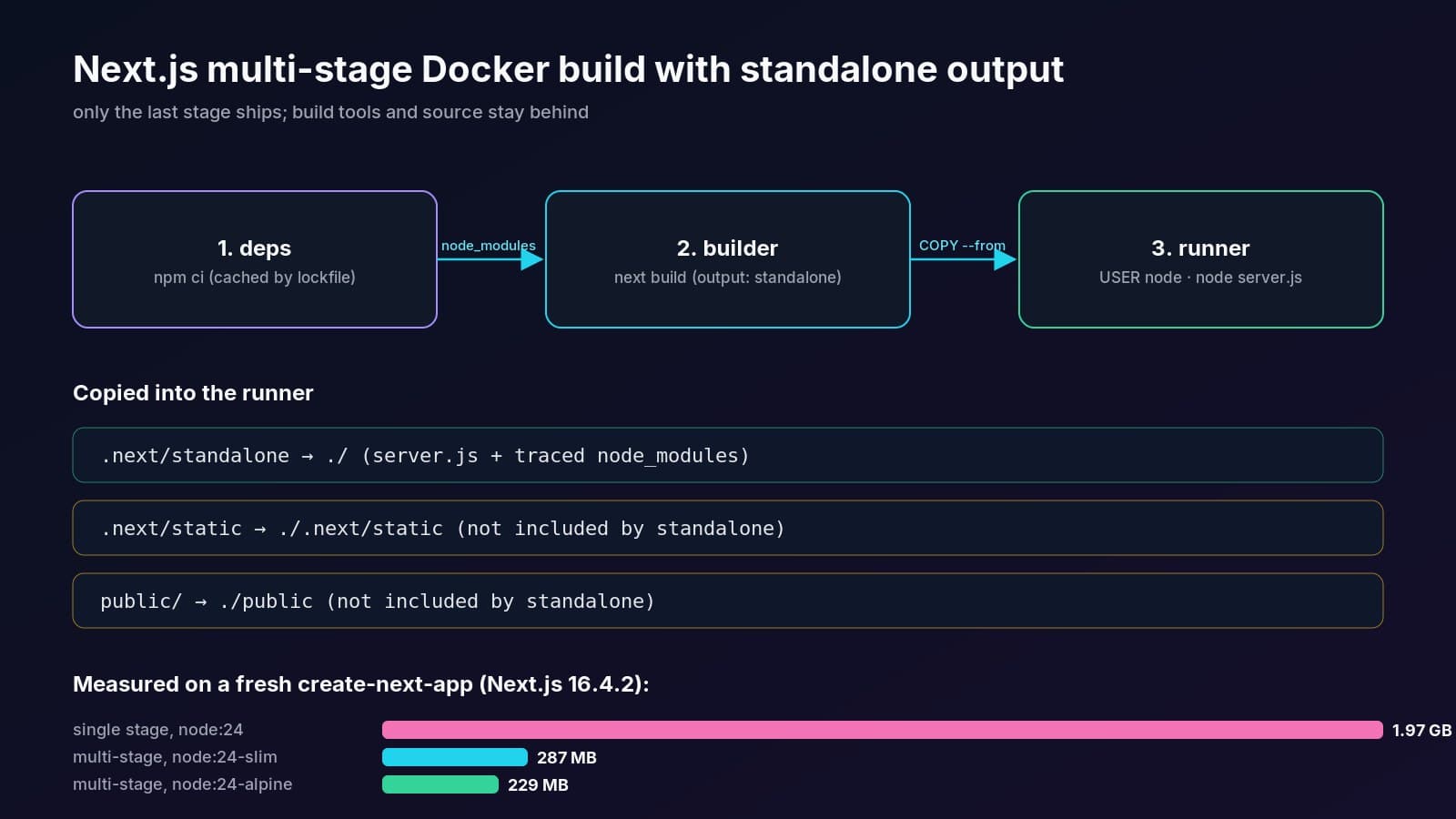
How do multi-stage Docker builds make Next.js images smaller?#
A multi-stage build lets the build stages carry the full node_modules, TypeScript, ESLint and the compiler, while the final stage copies only the build output. Docker ships just the last stage, so none of the build tooling, source code or package cache ends up in the production image.
The Docker multi-stage build docs describe this pattern: each FROM starts a fresh stage, and COPY --from=<stage> pulls selected files forward. For Next.js the three stages do one job each:
- deps copies only
package.jsonand the lockfile, then runsnpm ci. Because source files are not copied yet, this layer stays cached until your dependencies change. - builder brings in
node_modulesand your source and runsnext build. - runner starts from a clean Node image and copies the standalone server, static files and
public/.
How much smaller is the image? (measured)#
I built a fresh Next.js 16.4.2 app from create-next-app (App Router, TypeScript, Tailwind) three ways on the same machine and compared docker images output:
The application files inside the standalone runner (/app) took 59 MB; the rest is the Node.js base image. Your numbers will differ with your dependencies, but the order of magnitude is typical, because the standalone trace keeps only the packages the server actually imports.
What does output: 'standalone' do in Next.js?#
output: 'standalone' tells next build to create a .next/standalone folder that contains a minimal server.js and only the files from node_modules that your routes need. You can run that folder with node server.js and no npm install, which is why it is the foundation of every small Next.js Docker image.
From the Next.js output docs, three details matter for Docker:
- It does not copy
public/or.next/static. Those are expected to go to a CDN, so the Dockerfile copies them next toserver.jsmanually. Forget this and your CSS, JS chunks and images return 404. PORTandHOSTNAMEcontrol where the server listens. Inside a container you wantHOSTNAME=0.0.0.0, otherwise the server may bind only to the container's own interface name and the published port will not answer.- Monorepos need
outputFileTracingRoot. If your app imports packages from outside its folder, set it to the repository root so tracing can include them. If a file is still missing,outputFileTracingIncludesadds it explicitly.
Should you use next start or node server.js in Docker?#
Use node server.js with standalone output. It runs the same Next.js server without needing the full node_modules tree or the next CLI, and it runs directly as PID 1 rather than through npm. That means docker stop sends SIGTERM straight to Node instead of to an npm wrapper process.
Which Node.js base image should you use for Next.js?#
Use the current Node.js LTS line; as of October 2026 that is Node.js 24 ("Krypton"), per the Node.js release schedule. Pick node:24-slim (Debian, glibc) as the safe default, or node:24-alpine (musl) for a smaller image if your native dependencies support musl.
Pin the version with an ARG (as in the Dockerfile above) so upgrading Node is a one-line change, and rebuild regularly to pick up base image security patches.
How do you run a Next.js container as a non-root user?#
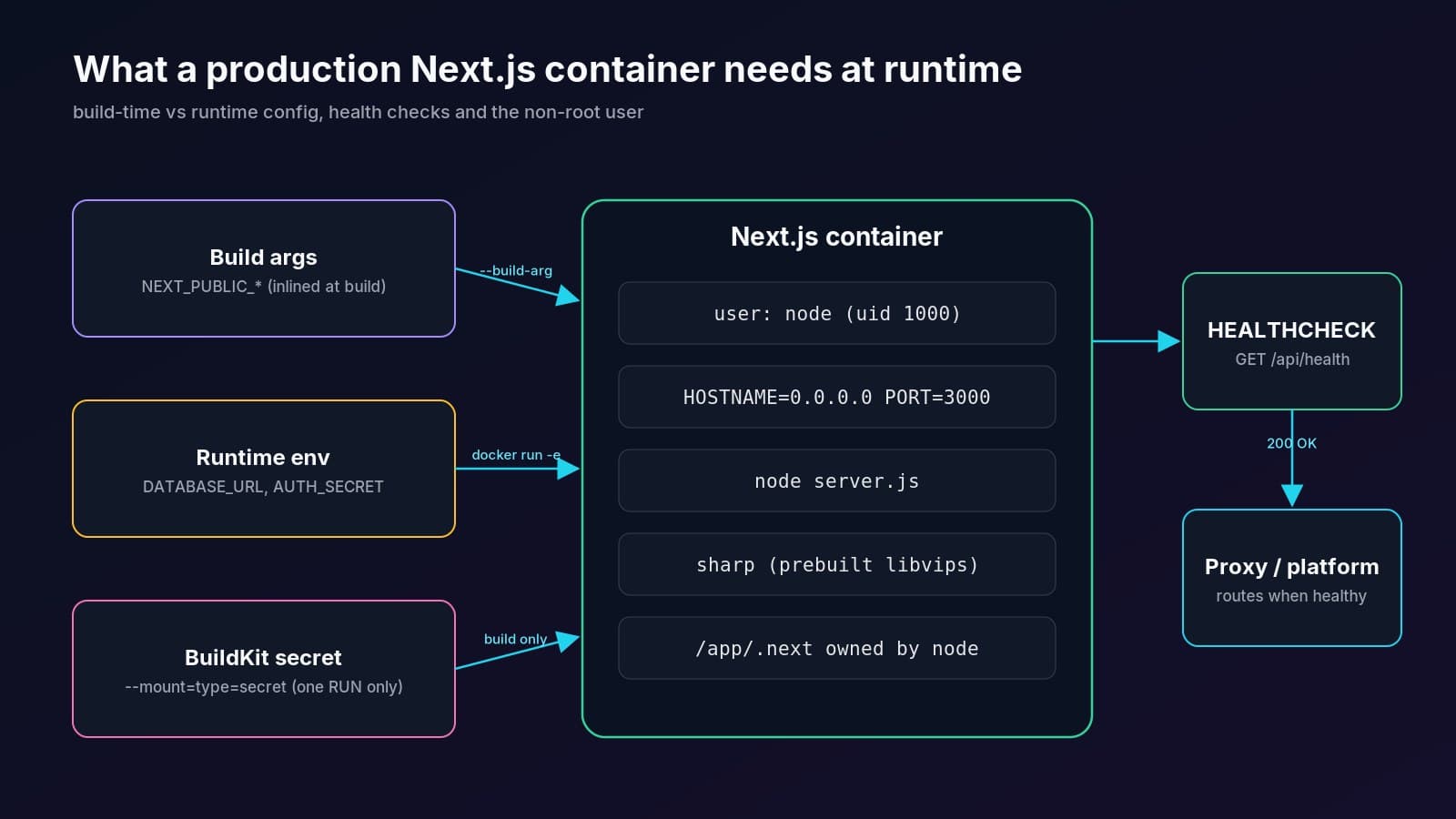
Switch to the non-root node user that ships in every official Node.js image with USER node, and give it ownership of the files it needs with COPY --chown=node:node. Create .next and chown it first, because Next.js writes its prerender and image cache there at runtime.
The Node.js Docker best practices recommend exactly this: the official images already include a node user (UID 1000), so there is no need to create your own. I confirmed it in the built container: id returns uid=1000(node) gid=1000(node).
Two permission mistakes cause most "EACCES" crashes:
- Copying files without
--chown, so they belong to root and the cache directory is read-only fornode. - Mounting a volume over
/app/.next/cachethat is owned by root on the host. Fix the host directory's owner or skip the mount.
How do you make sharp work in a Next.js Docker image?#
With Next.js 15 and later you usually do nothing: next pulls in sharp as a dependency, and standalone tracing copies it into the image along with its prebuilt libvips binaries for Linux. Run npm ci inside the container (not on your Mac or Windows host) so the correct Linux binaries are installed.
In my test build, the runner's node_modules contained sharp plus @img/sharp-linux-x64 and @img/sharp-libvips-linux-x64 without any extra configuration, and calling require('sharp') inside the running container worked (sharp 0.35.5).
If you do see the sharp missing in production warning, check these in order:
- Do not copy a host
node_modulesinto the image. Keepnode_modulesin.dockerignore. - Match the platform. Building on Apple Silicon for an x64 server? Use
docker build --platform linux/amd64so the right binaries are chosen. - Force the files into the trace. Add
outputFileTracingIncludes: { '/*': ['node_modules/sharp/**/*'] }tonext.config, as the Next.js docs show for native assets.
Remember the default image optimizer runs on your server's CPU. If you serve lots of images, the self-hosting guide explains how to swap in a custom loader that points to an image CDN.
How do you handle environment variables in a Next.js Docker build?#
Treat them as two different things. Variables prefixed with NEXT_PUBLIC_ are inlined into the browser JavaScript at next build, so they must be passed as build arguments. Everything else (database URLs, API keys, auth secrets) is read by the server at runtime, so pass it with docker run -e or your platform's environment settings and never bake it into the image.
The Next.js environment variables guide spells this out: once built, a NEXT_PUBLIC_ value is frozen into the bundle. Changing it later requires a rebuild.
What if the build itself needs a secret?#
Some builds need a secret, for example to fetch data during prerendering or to install a private package. Do not use ARG for it, because build arguments can show up in image history. Use a BuildKit secret mount, which exposes the value only for one RUN step:
RUN --mount=type=secret,id=npm_token,env=NPM_TOKEN npm cidocker build --secret id=npm_token,env=NPM_TOKEN .A simpler rule that avoids most of this: keep pages that need secrets dynamic, so they read runtime env on the request instead of at build time.
How do you add a health check to a Next.js container?#
Add a tiny route handler that returns 200, then point a Dockerfile HEALTHCHECK at it using Node's built-in fetch, because slim and Alpine images do not include curl by default. Docker marks the container healthy or unhealthy, and orchestrators like Coolify, Compose and Swarm use that status to decide when traffic can switch to a new deploy.
The health route (App Router):
// src/app/api/health/route.ts
import { connection } from "next/server";

export async function GET() {
  await connection(); // opt out of prerendering: answer on every request
  return Response.json({ status: "ok", uptime: process.uptime() });
}
await connection() makes the handler run on every request, so a stuck server cannot hide behind a prerendered response. The Dockerfile HEALTHCHECK reference explains the options used above:
--start-period=20sgives the server time to boot before failures count.--interval=30sand--timeout=5sset how often and how long each probe runs.--retries=3means three failures in a row flip the status to unhealthy.
Running the test image, docker inspect reported healthy and /api/health returned {"status":"ok",...}. Keep this endpoint cheap. If you also want a readiness check that pings the database, make it a separate route so a slow database does not get the whole container restarted.
How do you speed up Next.js Docker builds?#
Order layers from least to most frequently changed, and use BuildKit cache mounts. Copy the lockfile and run npm ci before copying source, so dependency installs are reused on every code-only change. The --mount=type=cache,target=/root/.npm flag keeps npm's download cache between builds without putting it into the image.
More options, from Docker's build cache optimization guide and the official example:
- Keep
.dockerignoretight so a changed README or.gitfolder does not invalidateCOPY . .. - Cache
.next/cachewithRUN --mount=type=cache,target=/app/.next/cache npm run buildto reuse compiler output. The official example notes the trade-off: that cache is then not in the final image, so fetch responses cached during the build are not available at startup. - Use the lockfile your project already has. The official example detects npm, Yarn or pnpm; if you use pnpm, swap the install line for
corepack enable pnpm && pnpm install --frozen-lockfileand copypnpm-lock.yaml.
How do you deploy this Next.js Dockerfile to Coolify or any host?#
Because the image is self-contained, any Docker host can run it: a plain VPS with docker run, Docker Compose, Kubernetes, Fly.io, Railway or Coolify. Expose port 3000, set runtime environment variables on the platform, pass NEXT_PUBLIC_ values as build arguments, and put a reverse proxy with HTTPS in front.
In Coolify specifically:
- Choose the Dockerfile build pack and keep the Dockerfile at the repository root.
- Set Ports Exposes to
3000. - Add runtime variables (like
DATABASE_URL) as normal environment variables, and make sureNEXT_PUBLIC_ones are available at build time so they reach theARGin the builder stage. - Coolify can use the container's health check during deploys, so the
HEALTHCHECKabove helps it avoid routing traffic to a container that never became healthy.
I walk through the full Coolify setup, including domains and PostgreSQL, in the self-hosting guide. If you are still deciding between platforms, Coolify vs Vercel for Next.js compares cost and trade-offs. This same pattern runs this site and projects like Foliora.
Running more than one replica?#
Each container has its own .next/cache, so ISR and image caches are not shared between replicas by default. The Next.js self-hosting guide covers configuring a shared cache handler (for example, Redis-backed) when you scale horizontally. A single container per app does not need this.
Common Next.js Docker errors and fixes#
Key takeaways#
- Enable
output: 'standalone'and use a three-stage Dockerfile; in my measured test that cut a fresh Next.js 16 image from 1.97 GB to 287 MB on Debian slim. - Standalone output does not include
public/or.next/static; copy both into the runner yourself. - Run as the built-in
nodeuser and give it ownership of.next, so the runtime cache can be written. NEXT_PUBLIC_variables are build-time and baked into the bundle; secrets belong in runtime env or BuildKit secret mounts, neverARG.- Add a cheap
/api/healthroute and a Nodefetch-basedHEALTHCHECKso your platform can roll out new containers safely.
Questions
Do I need output: 'standalone' to run Next.js in Docker?
No, but it is strongly recommended. Without it you must ship the full node_modules and run next start. With it, next build produces a minimal server.js plus only the traced dependencies, so the runtime image is far smaller and needs no npm install.
Why are my CSS and JS files returning 404 in the Next.js Docker container?
Standalone output does not include the public folder or .next/static. Copy both into the runner stage: .next/static to ./.next/static and public to ./public, next to server.js. The standalone server then serves them automatically.
Should I use node:24-alpine or node:24-slim for Next.js?
Use node:24-slim as the safe default because it uses glibc and works with almost every native module, including sharp's prebuilt binaries. Alpine is smaller but uses musl, which some native dependencies do not support. In my test the Alpine image was 229 MB vs 287 MB for slim.
How do I pass environment variables to a Next.js Docker image?
Pass NEXT_PUBLIC_ variables as build arguments, because Next.js inlines them into the browser bundle during next build. Pass server-only values like DATABASE_URL at runtime with docker run -e or your platform's settings. Never put secrets in ARG; use a BuildKit secret mount if the build needs one.
Do I need to install sharp manually in a Next.js Docker image?
Usually not on Next.js 15 and later. Next.js depends on sharp and standalone tracing copies it, with its prebuilt Linux libvips binaries, into the image. Install dependencies inside the container and keep host node_modules out of the build context so the correct platform binaries are used.
How do I add a Docker health check without curl?
Slim and Alpine Node images do not include curl, so use Node's built-in fetch in the HEALTHCHECK command to call a lightweight /api/health route and exit 0 on a 2xx response or 1 otherwise. Add a start period so the server has time to boot.
Share