Coolify vs Vercel for Next.js: Cost, Features and Trade-offs
Coolify vs Vercel for Next.js, compared on real pricing, Next.js feature support, previews, databases, long-running work and lock-in, plus a safe migration checklist.

On this page
- What is the real difference between Coolify and Vercel?
- Coolify vs Vercel: how do they compare side by side?
- How much does Vercel cost compared to Coolify?
- What does Vercel charge?
- What does Coolify charge?
- A worked example
- Does Next.js work the same on Coolify as on Vercel?
- What changes when you run more than one instance?
- What about image optimization?
- When is Vercel the better choice?
- When is Coolify the better choice?
- What do you give up when you self-host with Coolify?
- How do you migrate a Next.js app from Vercel to Coolify?
- So, should you use Coolify or Vercel for Next.js?
Coolify vs Vercel comes down to who runs the infrastructure. Vercel is a fully managed platform that deploys Next.js with zero configuration and bills per seat plus usage, while Coolify is a free, open-source control plane that runs your app as Docker containers on servers you own, for a flat server cost.
Pick Vercel when you want zero ops, global edge delivery and polished previews out of the box. Pick Coolify when you want predictable costs, databases and background workers next to your app, and almost no platform lock-in. I've run Next.js on both: this site, fabwaseem.com, used to live on Vercel with a Neon database and now runs on Coolify with its own PostgreSQL. This guide compares the two on the things that actually decide the choice (pricing model, Next.js feature support, previews, databases, long-running work, scaling and lock-in), using the official numbers as of October 2026, and ends with a migration checklist if you decide to switch.
If you've already picked Coolify, my step-by-step guide on how to self-host Next.js with Coolify covers the full setup.
What is the real difference between Coolify and Vercel?#
Vercel sells a finished platform. You connect a repository and get a managed build fleet, a serverless functions runtime, a global CDN, automatic TLS, preview URLs, analytics and spend controls. You never see a server. Vercel also maintains Next.js, so the integration is first-party.
Coolify gives you the control plane and leaves the hardware to you. In its own words, Coolify "provides the deployment control plane and coordinates Docker on servers you connect." It handles Git integration, builds (Nixpacks, Railpack, a Dockerfile or Docker Compose), the reverse proxy and certificates, one-click databases and services, preview deployments, health checks and rollbacks. The server itself is yours: its capacity, OS updates, backups and recovery.
Almost everything else in this comparison follows from that one difference.
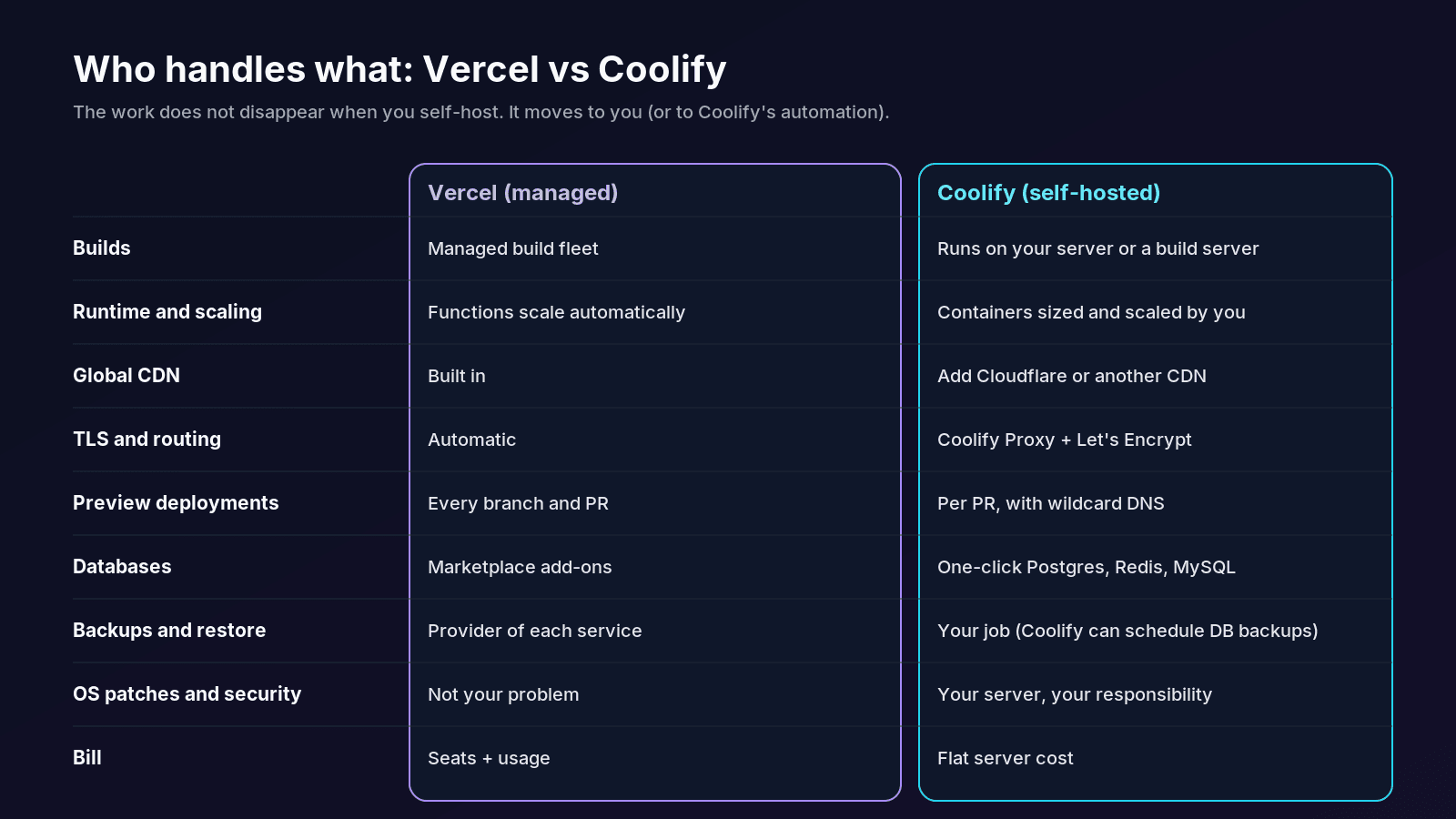
Coolify vs Vercel: how do they compare side by side?#
Here is the short version, based on Vercel's and Coolify's own documentation and pricing pages as of October 2026.
The details behind each row are below.
How much does Vercel cost compared to Coolify?#
The two pricing models are different shapes, so compare them on your situation rather than on a single headline number.
What does Vercel charge?#
Vercel's Hobby plan is free, but it's restricted to non-commercial personal use. According to Vercel's fair use guidelines, commercial use includes any deployment built for financial gain, "including a paid employee or consultant writing the code", so client sites, SaaS products and sites with ads need Pro. Hobby also comes with fixed caps (for example 100 GB of Fast Data Transfer, 1 million function invocations and 5,000 image transformations a month), and projects are paused when you exceed them. You can't buy extra usage on Hobby.
The Pro plan costs a $20/month platform fee that includes one deploying seat and $20 of monthly usage credit. Each additional Owner or Member seat is $20/month; Viewer seats are free. Pro also includes a Flat Rate CDN tier of 1 million CDN requests and 1 TB of data transfer a month. Once the credit is used, usage is billed on demand, for example $0.60 per million function invocations, Active CPU from $0.128 an hour, and $0.05 per 1,000 image transformations. New teams get a default on-demand budget of $200 with alerts, and you can configure a hard limit that pauses projects.
What does Coolify charge?#
Self-hosted Coolify is free forever with no feature restrictions, according to the Coolify pricing page. You pay your server provider, and that's it. Coolify itself needs at least 2 CPU cores, 2 GB of RAM and 10 GB of disk, and your apps need room on top of that.
If you don't want to run the Coolify dashboard yourself, Coolify Cloud costs $5/month for two connected servers plus $3/month for each additional one. You still bring your own servers; Cloud only manages the Coolify instance.
A worked example#
Take a team of three developers who all deploy. On Vercel Pro, that's the $20 platform fee (one seat included) plus two extra seats at $20 each: $60/month before any usage beyond the $20 credit. On Coolify, team members are unlimited, so the same three people add nothing. The bill is your server cost, whether you run one app or ten.
The flip side is that a server costs the same at zero traffic as at peak, and it scales in steps (a bigger box, another box) rather than smoothly. There is also the cost that never shows up on an invoice: your time. Updates, backups and monitoring are now your job. If an hour of your time is worth more than the monthly difference, Vercel is the cheaper option.
Does Next.js work the same on Coolify as on Vercel?#
For features, yes. The Next.js guide to deploying to platforms is explicit: "To run Next.js, your platform needs a Node.js server. That's it." A single next start process handles Server Components, ISR, Partial Prerendering, Cache Components, Server Actions, Proxy (the new name for Middleware) and after(). The only extra dependency is sharp for image optimization. The same page notes that Vercel's own adapter uses the same public adapter API as every other platform.
The difference is performance, not correctness. On Vercel, static assets and cached pages are served from a global edge network. On a single Coolify server, everything comes from one origin in one region. For most sites, putting a CDN such as Cloudflare in front for static assets closes most of that gap.
Start from a config that is portable to both:
// next.config.ts
import type { NextConfig } from 'next'

const nextConfig: NextConfig = {
  // Lean, self-contained server bundle for Docker. Harmless on Vercel.
  output: 'standalone',
  // Same value on every instance of one release, so clients and servers agree.
  deploymentId: process.env.DEPLOYMENT_VERSION,
}

export default nextConfig
What changes when you run more than one instance?#
This is where self-hosting gets real. By default, the ISR and data cache live on each server's local disk, so a revalidateTag() call on one container doesn't reach the others. Once you scale out, you need three things the platform otherwise handles for you:
- A shared cache handler (Redis is the usual choice).
- The same
NEXT_SERVER_ACTIONS_ENCRYPTION_KEYon every instance, or Server Actions fail with "Failed to find Server Action" errors. - A consistent
deploymentIdper release, so rolling deploys don't cause version skew.
// next.config.js (multi-instance setup)
module.exports = {
  output: 'standalone',
  cacheHandler: require.resolve('./cache-handler.js'), // Redis-backed handler
  cacheMaxMemorySize: 0, // disable the per-process in-memory cache
  deploymentId: process.env.DEPLOYMENT_VERSION,
}
On a single Coolify server running one container, you need none of this. That's one reason a single, well-sized server is often the sweet spot.
What about image optimization?#
On Vercel, next/image transformations are a metered resource. On Coolify, they're free in dollars but cost CPU and memory on your server. If your site is image-heavy, a custom loader that points to an image CDN keeps both bills predictable, and it works the same on either platform:
// lib/cloudinary-loader.ts
// next.config.ts: images: { loader: 'custom', loaderFile: './lib/cloudinary-loader.ts' }
export default function cloudinaryLoader({
  src,
  width,
  quality,
}: {
  src: string
  width: number
  quality?: number
}) {
  const params = ['f_auto', 'c_limit', `w_${width}`, `q_${quality || 'auto'}`]
  return `https://res.cloudinary.com/<your-cloud>/image/upload/${params.join(',')}/${src}`
}
When is Vercel the better choice?#
Vercel wins clearly in these situations:
- Nobody on the team wants to own a server. For a commercial project that has to be live today with no ops time available, Pro is worth the money.
- Your audience is global and latency-sensitive. A built-in edge network is hard to match with one server in one region.
- Previews are central to how you review work. Every branch push gets a preview URL with no DNS or webhook setup.
- Traffic is spiky or unpredictable. Functions scale automatically, and you pay for usage instead of provisioning for the peak.
- It's a personal, non-commercial project. Hobby is free and perfectly good for that.
- You already depend on Vercel-only products. If you use Edge Config, Vercel Blob or Vercel's analytics heavily, staying avoids a rewrite.
When is Coolify the better choice?#
Coolify wins when the app is more than a frontend:
- Several apps and databases on one bill. A single server can run a Next.js frontend, a NestJS API, PostgreSQL, Redis and a worker, all on the same private Docker network. An app like Foliora, a Next.js portfolio and blog platform on Prisma and PostgreSQL, maps naturally onto one Coolify project with the database right next to it.
- Long-running work. Vercel Functions stop at their maximum duration (300 seconds by default, up to 800 seconds on Pro). Queues, scheduled jobs and media processing don't fit that model well. A self-hostable media download API like Snagbox is exactly the kind of workload that belongs in a long-running container.
- Persistent files. Uploads, generated files and SQLite databases can live on a volume instead of a separate storage service.
- Predictable cost. No per-seat pricing and no usage meter. The bill only changes when you change the server.
- Control over where data lives. You choose the provider and the region.
- Minimal lock-in. Everything is a Docker image, so moving to another server or provider is a redeploy, not a migration project.
What do you give up when you self-host with Coolify?#
Be honest with yourself about this list before you switch, because it's the real price of the lower bill:
- You're the ops team. OS security patches, Docker updates, Coolify updates and disk space (old images pile up) are yours to watch.
- Backups are your responsibility. Coolify can schedule dumps for PostgreSQL, MySQL, MariaDB and MongoDB, but its docs are clear that a rollback "does not restore databases or persistent files". Send backups off the server.
- One server is one point of failure. If it goes down, everything on it goes down until you fix it or fail over.
- Security starts at install. Coolify's install guide warns that "anyone who reaches the registration page first can become the instance admin and gain root access to your server", so create the admin account immediately.
- Previews run untrusted code. A pull request can execute code on your server, so keep preview access to repository members and never give previews production credentials.
Add a health check so Coolify's rolling updates only switch traffic to a container that actually works:
// app/api/health/route.ts
import { connection } from 'next/server'

export async function GET() {
  await connection() // always run at request time, never prerendered
  return Response.json({ status: 'ok', time: new Date().toISOString() })
}
Point the health check at /api/health in the app's settings. If your app can't serve requests without the database, check the connection there too.
How do you migrate a Next.js app from Vercel to Coolify?#
Coolify's documentation recommends deploying first and moving DNS last. This is the order I'd follow:
-
Audit what's Vercel-specific. Search for platform SDKs and config that won't move with you:
grep -rn "@vercel/" package.json app src lib 2>/dev/null
cat vercel.json 2>/dev/null   # rewrites, headers and crons live here
Rewrites and headers can move into
next.config.ts. Vercel cron jobs become Coolify scheduled tasks or a small worker container. -
Make the build portable. Add
output: 'standalone'and either let Nixpacks detect the app or use a multi-stage Dockerfile (the self-hosting guide has one you can copy). -
Deploy to Coolify without touching DNS. Set environment variables and mark every
NEXT_PUBLIC_*value as a build-time variable, because those are inlined duringnext build. -
Move the data with writes stopped. For PostgreSQL, a dump and restore is the simplest safe path:
pg_dump "$OLD_DATABASE_URL" --format=custom --no-owner --no-acl --file=app.dump pg_restore --dbname="$NEW_DATABASE_URL" --no-owner --no-acl app.dump -
Test on the generated Coolify domain. Check the health endpoint, logins, forms, image optimization and revalidation.
-
Switch DNS. Lower the TTL a day ahead, then point the A record at your server and let Coolify issue the certificate.
-
Keep Vercel running until you're sure. Watch the runtime logs for a few days, then remove the old project.
So, should you use Coolify or Vercel for Next.js?#
Use Vercel if your time is the scarcest resource, your traffic is global or spiky, and the app is mostly a frontend. Use Coolify if you run several apps or services, need databases, workers or persistent files next to your app, and want a bill that doesn't move with traffic or team size. Plenty of teams do both: marketing sites on Vercel, APIs and data on a Coolify server.
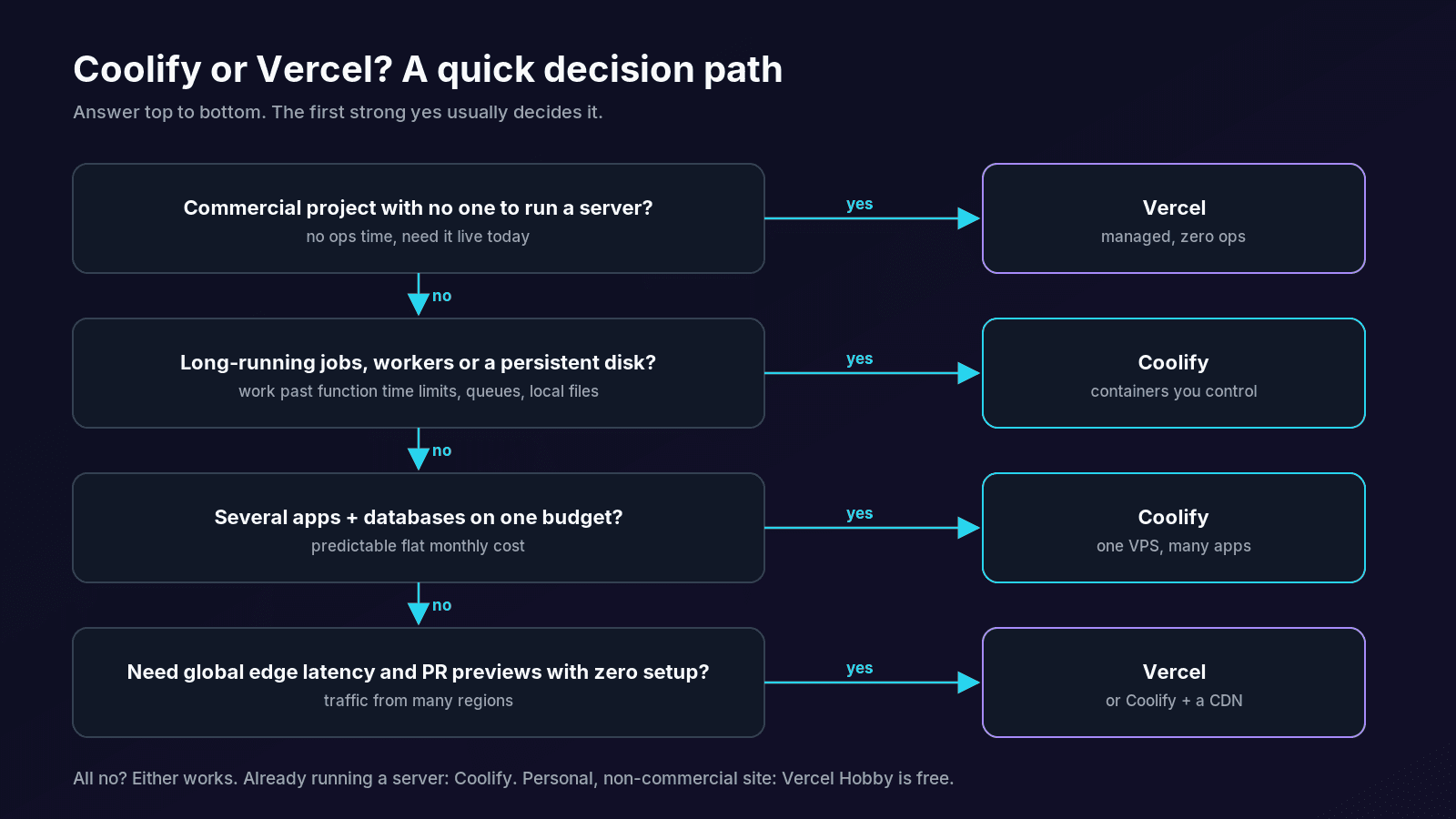
For full-stack work, a single, well-sized Coolify server with off-site backups and a CDN in front is a strong default. Vercel stays the easy answer when a project is frontend-only or there's simply no one to look after a server. If you're weighing this for a product of your own, take a look at what I build and the projects I've built.
Questions
Is Coolify a good alternative to Vercel for Next.js?
Yes, for most full-stack apps. Next.js only needs a Node.js server, so features like Server Components, ISR, Server Actions and Proxy work on Coolify through next start or a standalone Docker image. What you give up is Vercel's managed global edge network and zero-ops experience: you look after the server, updates and backups yourself.
Is Coolify really free?
Self-hosted Coolify is free forever with every feature included; you only pay for the servers you run it on. If you'd rather not host the Coolify dashboard yourself, Coolify Cloud costs $5 a month for two connected servers plus $3 a month for each additional server, and you still bring your own servers.
Can I use Vercel's free Hobby plan for a client or business website?
No. Vercel's fair use guidelines restrict Hobby to non-commercial personal use. Commercial use includes sites that take payments, advertise a product or service, show ads, or are built by a paid employee or consultant. Those need the Pro or Enterprise plan.
Does ISR work when you self-host Next.js on Coolify?
Yes. On a single next start instance, ISR and on-demand revalidation work out of the box, with the cache stored on the container's disk. Regenerated pages don't survive a redeploy unless you persist the cache, and if you run several instances you need a shared cache handler, usually Redis, so revalidateTag reaches every instance.
How long can a request run on Vercel compared to Coolify?
Vercel Functions run for 300 seconds by default. Hobby is capped at 300 seconds, Pro can go up to 800 seconds, and a 30-minute extended maximum is in beta for some runtimes. Coolify runs normal containers, so there is no platform time limit, although long jobs are still better handled by a background worker than by a web request.
Can I move from Vercel to Coolify without downtime?
Yes, if you deploy first and move DNS last. Deploy to Coolify, set environment variables, test on the generated domain, lower your DNS TTL ahead of time, then switch the A record and keep the Vercel project running until the new deployment is stable. The only planned pause is a short write freeze while you dump and restore the database.
Share