How to Build a ComfyUI Custom Node with a JavaScript UI
Build a ComfyUI custom node with its own JavaScript UI: INPUT_TYPES and the V3 schema, WEB_DIRECTORY, passing UI picks into node outputs, routes, saving state and publishing to the Comfy Registry. Tested on ComfyUI 0.42.1.


On this page
A ComfyUI custom node is a Python class that ComfyUI loads from a folder in custom_nodes. Most tutorials stop there. The interesting part starts when the node needs its own interface: a gallery, a picker, a preview panel. Then you need a JavaScript extension in the browser and a way to get what the user picked into the Python side when the graph runs.
I built that for Civitai Gallery Explorer, my open-source node pack that puts the Civitai image gallery inside a ComfyUI node. You browse and filter posts, then the selected positive prompt, negative prompt, preview image and LoRA metadata come out of the node as normal outputs. It's on the Comfy Registry as civitai-gallery-explorer, which showed 1.5K downloads when I checked the page on October 25, 2026.
This guide walks through the same structure with a small example pack you can copy, then shows how the real pack does each part. I tested everything on a clean ComfyUI install, and I only report numbers I measured.
What I tested, and on what#
- ComfyUI v0.42.1 (release tarball), frontend package 1.55.18, Python 3.12, CPU-only PyTorch 2.14.1, started with
--cpu - Civitai Gallery Explorer 1.0.4, installed from the registry's own
node.zip - A minimal example pack,
fw-prompt-picker, written for this post: a V3 node, a Python route, a JSON file on disk and a JavaScript DOM widget, plus the V1 version of the same node - Headless Chrome against the running server, to check that the JavaScript UI renders and that a click ends up in the node's outputs
What I measured:
The import time is short because ComfyUI has already imported torch, aiohttp and numpy by the time it reaches custom nodes. ComfyUI rounds the time it prints to 0.1 s, so I changed the format string in my local copy to four decimals to get these numbers.
How ComfyUI loads a custom node pack#
When ComfyUI starts, it imports every folder in ComfyUI/custom_nodes as a Python package. In v0.42.1, nodes.py then looks at the module for three things:
NODE_CLASS_MAPPINGS: the classic (V1) way to register nodescomfy_entrypoint: the V3 way, used when there is noNODE_CLASS_MAPPINGSWEB_DIRECTORY: a folder of.jsfiles to serve to the browser
It also reads pyproject.toml and registers a web folder named in [tool.comfy], but WEB_DIRECTORY is what the docs and most packs use.
A pack with a UI looks like this:
custom_nodes/fw-prompt-picker/
├── __init__.py        # exports comfy_entrypoint and WEB_DIRECTORY
├── nodes.py           # node class + HTTP routes
├── presets.json       # state saved on disk
├── js/
│   └── prompt_picker.js
└── pyproject.toml     # registry metadata
The fastest way to start is comfy node scaffold from comfy-cli. It asks a few questions and can include a web directory for you.
Node anatomy: INPUT_TYPES, RETURN_TYPES, FUNCTION, CATEGORY#
The classic node API is still the one most examples use, and it's what most people search for. A V1 node is a plain class with four required parts:
import json


class PromptPickerV1:
    CATEGORY = "fabwaseem/examples"      # where it appears in the Add Node menu
    RETURN_TYPES = ("STRING", "STRING")  # output socket types
    RETURN_NAMES = ("positive", "negative")
    FUNCTION = "run"                     # method ComfyUI calls

    @classmethod
    def INPUT_TYPES(cls):
        return {"required": {"selection": ("STRING", {"default": "{}"})}}

    def run(self, selection):
        data = json.loads(selection or "{}")
        return (data.get("positive", ""), data.get("negative", ""))  # always a tuple


NODE_CLASS_MAPPINGS = {"FW_PromptPickerV1": PromptPickerV1}
NODE_DISPLAY_NAME_MAPPINGS = {"FW_PromptPickerV1": "Prompt Picker (V1)"}
I loaded this class as its own pack on the test install. /object_info listed it as Prompt Picker (V1) in fabwaseem/examples with outputs STRING, STRING named positive and negative, and a queued graph returned both strings.
IMAGE in ComfyUI always means a batch: a torch.Tensor shaped [B, H, W, C], so a single image is a batch of one.
The V3 schema (what the real pack uses)#
ComfyUI's docs now describe a V3 schema and say new node features will only be added there. Inputs and outputs are objects, the run method is always the class method execute, and a comfy_entrypoint() function replaces NODE_CLASS_MAPPINGS. Here's the example node in V3:
import json

from comfy_api.latest import ComfyExtension, io


class PromptPicker(io.ComfyNode):
    @classmethod
    def define_schema(cls) -> io.Schema:
        return io.Schema(
            node_id="FW_PromptPicker",          # prefix it to avoid clashes
            display_name="Prompt Picker",
            category="fabwaseem/examples",
            inputs=[
                # Filled by the JavaScript UI, hidden from the user
                io.String.Input("selection", default="{}"),
            ],
            outputs=[
                io.String.Output(display_name="positive"),
                io.String.Output(display_name="negative"),
            ],
        )

    @classmethod
    def execute(cls, selection: str) -> io.NodeOutput:
        try:
            data = json.loads(selection or "{}")
        except ValueError:
            data = {}
        if not isinstance(data, dict):
            data = {}
        return io.NodeOutput(str(data.get("positive", "")), str(data.get("negative", "")))


class PromptPickerExtension(ComfyExtension):
    async def get_node_list(self) -> list[type[io.ComfyNode]]:
        return [PromptPicker]


async def comfy_entrypoint() -> ComfyExtension:
    return PromptPickerExtension()
The browser doesn't care which API you used. I loaded the real pack and asked /object_info/CivitaiGalleryExplorerNode what it exposes. The V3 schema came back in the same shape a V1 INPUT_TYPES dict produces: four STRING inputs (selection_data, positive_prompt, negative_prompt, lora_data) and outputs STRING, STRING, IMAGE, STRING, STRING named positive_prompt, negative_prompt, image, info, lora_data. Here is the real schema from Civitai_Gallery_Explorer.py, shortened:
class CivitaiGalleryExplorerNode(comfy_io.ComfyNode):
    @classmethod
    def define_schema(cls) -> comfy_io.Schema:
        return comfy_io.Schema(
            node_id="CivitaiGalleryExplorerNode",
            display_name="🖼️ Civitai Gallery Explorer",
            category="💡fabwaseem/Civitai",
            inputs=[
                comfy_io.String.Input("selection_data", default="{}", multiline=False,
                                      tooltip="JSON payload set by the UI (selected item + flags)."),
                comfy_io.String.Input("positive_prompt", default="", multiline=True),
                comfy_io.String.Input("negative_prompt", default="", multiline=True),
                comfy_io.String.Input("lora_data", default="[]", multiline=True),
            ],
            outputs=[
                comfy_io.String.Output(display_name="positive_prompt"),
                comfy_io.String.Output(display_name="negative_prompt"),
                comfy_io.Image.Output(display_name="image"),
                comfy_io.String.Output(display_name="info"),
                comfy_io.String.Output(display_name="lora_data"),
            ],
        )
Its execute returns a plain tuple rather than io.NodeOutput. That still worked on v0.42.1 (the test graph below ran fine), but io.NodeOutput is what the docs show, and it's the safer choice.
Adding a JavaScript UI with WEB_DIRECTORY#
Export WEB_DIRECTORY from __init__.py and ComfyUI serves every .js file in that folder under /extensions/<folder-name>/. The frontend imports them as ES modules on page load.
# __init__.py
from .nodes import comfy_entrypoint  # noqa: F401

WEB_DIRECTORY = "./js"
__all__ = ["WEB_DIRECTORY", "comfy_entrypoint"]
In the browser, app.registerExtension gives you hooks. nodeCreated(node) runs for every new node instance, so check node.comfyClass and only touch your own node. Then add your HTML with node.addDOMWidget:
import { app } from "../../scripts/app.js";
import { api } from "../../scripts/api.js";

app.registerExtension({
  name: "fabwaseem.PromptPicker",
  async nodeCreated(node) {
    // Called for every new node instance; only touch ours
    if (node.comfyClass !== "FW_PromptPicker") return;

    // 1. Hide the raw JSON widget; the UI writes to it
    const sel = node.widgets.find((w) => w.name === "selection");
    sel.hidden = true;

    // 2. Add our own HTML as a DOM widget
    const root = document.createElement("div");
    root.className = "fw-picker";
    root.style.cssText = "display:flex;flex-direction:column;gap:4px;overflow:auto";
    node.addDOMWidget("picker", "div", root, { serialize: false });

    // 3. Load presets from our Python route and render buttons
    const res = await api.fetchApi("/fw_prompt_picker/presets");
    for (const item of await res.json()) {
      const btn = document.createElement("button");
      btn.textContent = item.positive.slice(0, 40);
      btn.onclick = () => {
        sel.value = JSON.stringify(item); // this is what Python receives
        node.setDirtyCanvas(true, true);
      };
      root.appendChild(btn);
    }
  },
});
This is the exact file I loaded in the test. Two notes from the docs and from testing. nodeCreated and beforeRegisterNodeDef run for every node type, including other packs' nodes, so return early. And use api.fetchApi instead of a bare fetch("/..."), because it adds the right base path for you.
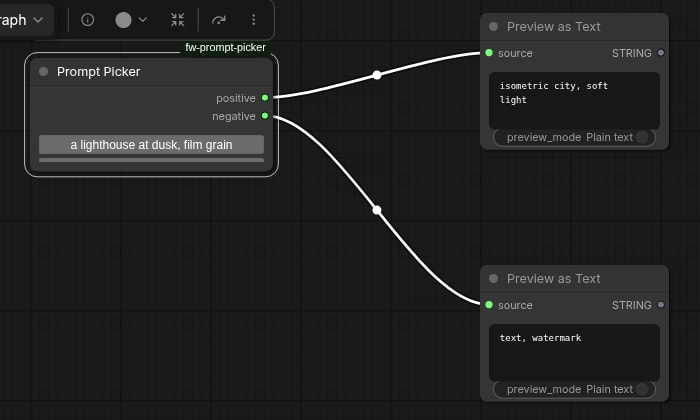
The example node after clicking the second preset and pressing Run, captured in headless Chrome on ComfyUI 0.42.1. The raw selection widget stays hidden. At the default node size, the second button sits below the first and is cut off, so give the node a larger size if you have more than one row.
The real pack does the same thing with a much bigger UI. It uses the older pattern of wrapping nodeType.prototype.onNodeCreated inside beforeRegisterNodeDef, which the docs now mark as deprecated, so if you wrap a method, always call the original. Its wrapper builds the gallery root, calls node.addDOMWidget("civitai_gallery", "div", root, {}), moves that widget to the top of the node and resizes the node to fit.
Getting data from the UI into the Python node#
This is the part that took me longest to get right. The browser and the Python node don't share memory. The only thing that reaches execute is the widget values that ComfyUI serializes into the prompt when you press Run. So the pattern is:
- Declare a
STRINGinput in Python (selectionhere,selection_datain the real pack). - Hide its widget in JavaScript.
- When the user clicks something, write JSON into that widget's value.
- In
execute, parse the JSON and turn it into outputs.
I checked this in headless Chrome against the running server. The extension registered, the node rendered both preset buttons from the Python route, the selection widget reported hidden: true, and clicking the second button set the hidden widget to {"positive":"isometric city, soft light","negative":"text, watermark"}. app.graphToPrompt() carried that string as the node's selection input, and after queueing the graph the two PreviewAny nodes showed isometric city, soft light and text, watermark.
The real pack adds two useful details. It writes the payload into the editable positive_prompt, negative_prompt and lora_data widgets too, so you can tweak a prompt before running. And it only downloads the preview image when someone needs it. The JavaScript checks whether output slot 2 (image) has links and puts the answer in the payload:
const imageOutIdx = 2;
const imageConnected =
  Array.isArray(node.outputs?.[imageOutIdx]?.links) &&
  node.outputs[imageOutIdx].links.length > 0;

const payload = { item: { ...item, meta: { ...meta } }, download_image: !!imageConnected };
setHiddenSelectionPayload(payload);
Python only fetches the image when download_image is true. Otherwise it returns an empty image tensor, so an unconnected output costs no network time.
To test the Python side on its own, I queued the real node through the HTTP API with a hand-written payload containing a prompt, a negative prompt and two resources, one LoRA and one checkpoint. It returned the prompt, the negative prompt, the rest of the metadata as info, and a lora_data list containing only the LoRA. The first run took 0.41 s end to end, including my polling loop. An identical second run came back in 4 ms with execution_cached, because nothing had changed.
Adding your own HTTP routes#
Your JavaScript often needs data the graph doesn't carry: a list of presets, saved favorites, results from an external API. ComfyUI runs on aiohttp, and PromptServer.instance.routes lets a pack add endpoints:
from aiohttp import web
from server import PromptServer

routes = PromptServer.instance.routes


@routes.get("/fw_prompt_picker/presets")
async def get_presets(request):
    return web.json_response(load_presets())


@routes.post("/fw_prompt_picker/presets")
async def add_preset(request):
    body = await request.json()
    if not isinstance(body, dict) or not str(body.get("positive", "")).strip():
        return web.json_response({"error": "positive is required"}, status=400)
    item = {"positive": str(body["positive"])[:4000], "negative": str(body.get("negative", ""))[:4000]}
    with _LOCK:
        items = load_presets()
        items.append(item)
        save_presets(items)
    return web.json_response({"count": len(items)})
Give every route a unique prefix (/fw_prompt_picker/..., /civitai_gallery/...). All packs share one server, so a generic path like /presets can collide with another pack.
The Civitai pack registers routes for favorites, tags, video checks and /civitai_gallery/images_stream, which calls the Civitai API from the server rather than from the browser. Before every upstream request, and on every redirect, it checks that the URL resolves to a public address. I wrote about that pattern for Node.js in SSRF protection in Node.js. This pack does the same thing in Python with ipaddress and socket.getaddrinfo.
Persisting state on disk (favorites)#
Favorites have to survive a restart and be shared by every workflow, so the pack keeps them in civitai_favorites.json next to the node. Two things matter: a lock, because aiohttp handlers can run at the same time, and an atomic write, so a crash halfway through never leaves a half-written file.
FAVORITES_FILE = os.path.join(NODE_DIR, "civitai_favorites.json")
_FAV_LOCK = threading.Lock()


def _write_favorites_unlocked(data: dict[str, Any]) -> None:
    tmp = FAVORITES_FILE + ".tmp"
    try:
        with open(tmp, "w", encoding="utf-8") as handle:
            json.dump(data, handle, indent=4, ensure_ascii=False)
            handle.flush()
            os.fsync(handle.fileno())
        os.replace(tmp, FAVORITES_FILE)
    except OSError as exc:
        print(f"CivitaiGalleryExplorer: Error saving favorites: {exc}")
        with suppress(OSError):
            os.remove(tmp)


def update_favorites(mutator):
    with _FAV_LOCK:
        data = _read_favorites_unlocked()
        result, dirty = mutator(data)
        if dirty:
            _write_favorites_unlocked(data)
        return result
The route handlers run the file work in a thread with await asyncio.to_thread(update_favorites, mutate), so a slow disk never blocks ComfyUI's event loop.
Packaging: pyproject.toml and [tool.comfy]#
The Comfy Registry reads pyproject.toml. comfy node init generates one, and the parts that matter are [project] and [tool.comfy]. This is the real file from the pack, trimmed:
[project]
name = "civitai-gallery-explorer"   # registry id, can't change later
description = "Browse Civitai gallery directly in ComfyUI with infinite scroll, advanced filters, favorites, and seamless prompt/model integration."
version = "1.0.4"                   # semver; bump it to publish
license = { file = "LICENSE" }
requires-python = ">=3.10"
dependencies = ["numpy>=1.21.0", "Pillow>=9.0.0", "aiohttp>=3.8.0", "tqdm>=4.65.0", "typing_extensions>=4.5.0"]

[project.urls]
Repository = "https://github.com/fabwaseem/ComfyUI-Civitai-Gallery-Explorer"

[tool.comfy]
PublisherId = "fabwaseem"
DisplayName = "CivitAI Gallery Explorer"
Icon = ""
includes = []
requires-comfyui = ">=0.3.60"
Don't list torch in your dependencies. ComfyUI already installed the right build for the user's GPU, and pulling in another one can break that install.
Publishing to the Comfy Registry#
Create a publisher on the registry, then create a publishing API key for it. After that you have two options.
From your machine:
comfy node validate   # metadata + security checks
comfy node publish    # prompts for the API key
From GitHub Actions, which is what the pack uses. Store the key as the REGISTRY_ACCESS_TOKEN repository secret. The workflow runs whenever pyproject.toml changes on main, so publishing a release means bumping version:
name: Publish to Comfy registry
on:
  workflow_dispatch:
  push:
    branches:
      - main
    paths:
      - "pyproject.toml"

jobs:
  publish-node:
    name: Publish Custom Node to registry
    runs-on: ubuntu-latest
    steps:
      - name: Check out code
        uses: actions/checkout@v4
      - name: Publish Custom Node
        uses: Comfy-Org/publish-node-action@main
        with:
          personal_access_token: ${{ secrets.REGISTRY_ACCESS_TOKEN }}
Users then install it with comfy node install civitai-gallery-explorer or from ComfyUI Manager.
CI: Ruff, an import test and a JS syntax check#
The pack's CI runs on every push. It lints with Ruff, runs pytest and checks that the JavaScript parses:
- name: Ruff
  run: ruff check .
- name: Import and unit tests
  run: python -m pytest -q tests
- name: Check gallery script syntax
  run: node --check js/Civitai_Gallery_Explorer.js
The Ruff config turns on the S (bandit security) and ASYNC rule sets as well as the usual E, F, I and UP, which catches blocking calls inside async route handlers. The import tests load the package the way ComfyUI does, because that's where custom node packs usually break (more on that below).
Common mistakes (some of them mine)#
- Sibling imports that only work in your editor. ComfyUI imports the folder as a package and doesn't add it to
sys.path, sofrom _safety import ...fails at load time. Use relative imports (from ._safety import ...). The pack's__init__.pyimports each module withimportlib.import_module(f".{base}", package). I installed it under bothcivitai-gallery-explorer(the registry folder name) andComfyUI-Civitai-Gallery-Explorer(the git clone name), and it loaded under both. - Using V1 method names on a V3 node. V3 renamed
IS_CHANGEDtofingerprint_inputs. My node definesis_changed, and in v0.42.1execution.pyonly looks forfingerprint_inputson V3 nodes, so that method is never called. It does no harm here, because the default cache already keys on the same inputs, but if you're migrating a V1 node that usesIS_CHANGEDto force reruns, rename it. - Returning a bare value from a V1 node.
return resultinstead ofreturn (result,)breaks the output mapping. The trailing comma matters. - Shipping your own state. By default
comfy node publishpackages every file tracked by git. My 1.0.4 archive is 4.6 MB: it includes the tests, the same 2.3 MB screenshot twice and acivitai_favorites.jsonwith one saved entry, so every new install starts with my favorite. Add a.comfyignore(same syntax as.gitignore) and git-ignore user state files. - Assuming the network looks like yours. On my test box, DNS answered
198.18.0.1for every hostname. That's a non-public benchmarking range, so the pack's public-address check refused every Civitai request and the gallery showedBlocked non-public URL. The check did its job, but fake-IP proxy setups (Clash, for example, defaults to198.18.0.1/16) produce the same answers on real machines. Show a clear error message and document the behavior. - Hooking every node.
beforeRegisterNodeDefandnodeCreatedrun for every node type, including other packs' nodes. Return early unless the class name matches yours.
Key takeaways#
- A ComfyUI custom node is a Python class; a UI is a separate ES module served from
WEB_DIRECTORYunder/extensions/<folder>/. - New nodes should use the V3 schema (
io.ComfyNode,define_schema,execute,comfy_entrypoint). The frontend sees the sameobject_infoshape either way. - The UI talks to Python through widget values: hide a
STRINGinput, write JSON to it on click, parse it inexecute. - Use
PromptServer.instance.routeswith a unique prefix for anything the UI needs that isn't in the graph, and keep blocking file or network work off the event loop. - Write state files atomically under a lock, and keep them out of the published archive with
.comfyignore. - Publish with
[tool.comfy]inpyproject.toml, pluscomfy node publishor the GitHub Action that runs on a version bump.
If you're building tools for AI workflows more broadly, my guide to Agent Skills and SKILL.md covers packaging instructions for coding agents, and the Civitai Gallery Explorer project page has screenshots of the finished node. The source is on GitHub.
Questions
Share