pgvector vs Pinecone vs Qdrant: Benchmarked for RAG in 2026
I loaded 100,000 OpenAI embeddings into pgvector 0.8.7 on Postgres 18 and Qdrant 1.19 and measured recall, latency, index build and filtered search, then compared Pinecone's documented limits and pricing. When you need a vector database, and when Postgres is enough.


On this page
pgvector is a PostgreSQL extension that stores embeddings in a vector column and searches them with HNSW or IVFFlat indexes, next to your normal tables. Qdrant is an open-source vector database you run yourself or use as a managed cloud. Pinecone is a fully managed, serverless vector database you only reach through an API.
For a RAG app, the real question is whether you need a separate vector database at all. I loaded the same 100,000 OpenAI embeddings (1,536 dimensions) into pgvector 0.8.7 on PostgreSQL 18.6 and into Qdrant 1.19.2 on one machine. Then I measured recall, latency, build time and filtered search. Pinecone is covered from its official docs and limits only, because I didn't run it and I won't invent numbers for it.
TL;DR: pgvector vs Pinecone vs Qdrant, which should I use?#
Start with pgvector if you already run Postgres and have up to a few million vectors. One database, SQL joins, transactions and backups you already have. Choose Qdrant when vector search is the core workload and you need the best recall per millisecond or heavy filtering. Choose Pinecone when you want zero infrastructure and accept a managed service with usage pricing.
Do I need a vector database for RAG?#
Usually not at first. If your app already uses PostgreSQL, pgvector adds vector search without a second system to deploy, secure, back up and keep in sync. In my test it answered top-10 queries over 100,000 OpenAI embeddings in 1.5-4 ms, with 95-99% recall. A dedicated database starts to pay off at very large scale, under heavy filtering, or when search load needs to scale separately.
The hidden cost of a separate vector store is synchronisation. Every document insert, update and delete has to reach two systems, and a failed write leaves them disagreeing. With pgvector the embedding sits in the same row and the same transaction as the document it describes.
What is pgvector?#
pgvector is an open-source PostgreSQL extension that adds vector, halfvec, bit and sparsevec types, distance operators like <=> (cosine) and <-> (L2), and approximate HNSW and IVFFlat indexes. Per the pgvector README, it "performs exact nearest neighbor search, which provides perfect recall" by default. An index trades a little recall for speed.
CREATE EXTENSION vector;

CREATE TABLE documents (
  id        bigint GENERATED ALWAYS AS IDENTITY PRIMARY KEY,
  tenant_id int NOT NULL,
  content   text NOT NULL,
  embedding vector(1536) NOT NULL
);

CREATE INDEX ON documents USING hnsw (embedding vector_cosine_ops);

-- top 5 chunks for a question, inside one tenant
SELECT id, content
FROM documents
WHERE tenant_id = $1
ORDER BY embedding <=> $2
LIMIT 5;
Index limits matter for model choice. HNSW can index a vector of "up to 2,000 dimensions" and a halfvec of "up to 4,000 dimensions". A 3,072-dimension model such as text-embedding-3-large needs a halfvec index or a shorter output size.
What are Qdrant and Pinecone?#
Qdrant is an open-source vector search engine written in Rust. It stores points (vectors plus a JSON payload), builds an HNSW index per segment, and adds payload indexes so filters run inside the graph search. You can run a single binary, Docker or Qdrant Cloud.
Pinecone is a managed, serverless vector database. Per its architecture docs, "all your vector data is stored in highly efficient, distributed object storage." Pinecone "separates write and read operations into different paths, with each scaling independently based on demand." There is no self-hosted version.
How I benchmarked pgvector and Qdrant#
- Data. The first 100,000 rows of the public DBpedia OpenAI embeddings dataset: 1,536-dimension
text-embedding-ada-002vectors of Wikipedia entities, a typical RAG shape. 1,000 held-out rows from the same dataset served as queries. - Ground truth. Exact cosine top-10 for every query, computed with NumPy. Recall@10 is the share of those 10 that each engine returned.
- Machine. One 8-vCPU, 15 GB Linux box, everything on localhost, no Docker.
- pgvector. PostgreSQL 18.6 with pgvector 0.8.7,
shared_buffers = 2GB,maintenance_work_mem = 2GB. HNSW with defaults (m = 16,ef_construction = 64), loaded with binaryCOPYthrough psycopg 3. - Qdrant. The Qdrant 1.19.2 release binary, cosine distance,
m = 16andef_construct = 64to match pgvector, default optimizer settings (it made 4 segments). Loaded with the official Python client over gRPC from a single process. - Queries. One client, sequential, 50 warm-up queries, then 1,000 timed queries. Latency includes the Python client round trip on both sides.
- Filters. Every vector got a random
categoryfrom 0 to 9, about 10% of rows each. Filtered queries asked for the top 10 inside one category.
Is pgvector fast enough? Recall and latency results#
Yes, at this scale both engines are fast. pgvector reached 0.948 recall@10 at 1.45 ms median with default settings, and 0.988 at 4.0 ms with hnsw.ef_search = 200. Qdrant reached 0.985 recall at 2.6 ms median and 0.999 at 5.4 ms. At roughly equal recall (about 98.5-98.8%), Qdrant was about 1.5 times faster: 2.6 ms against 4.0 ms.
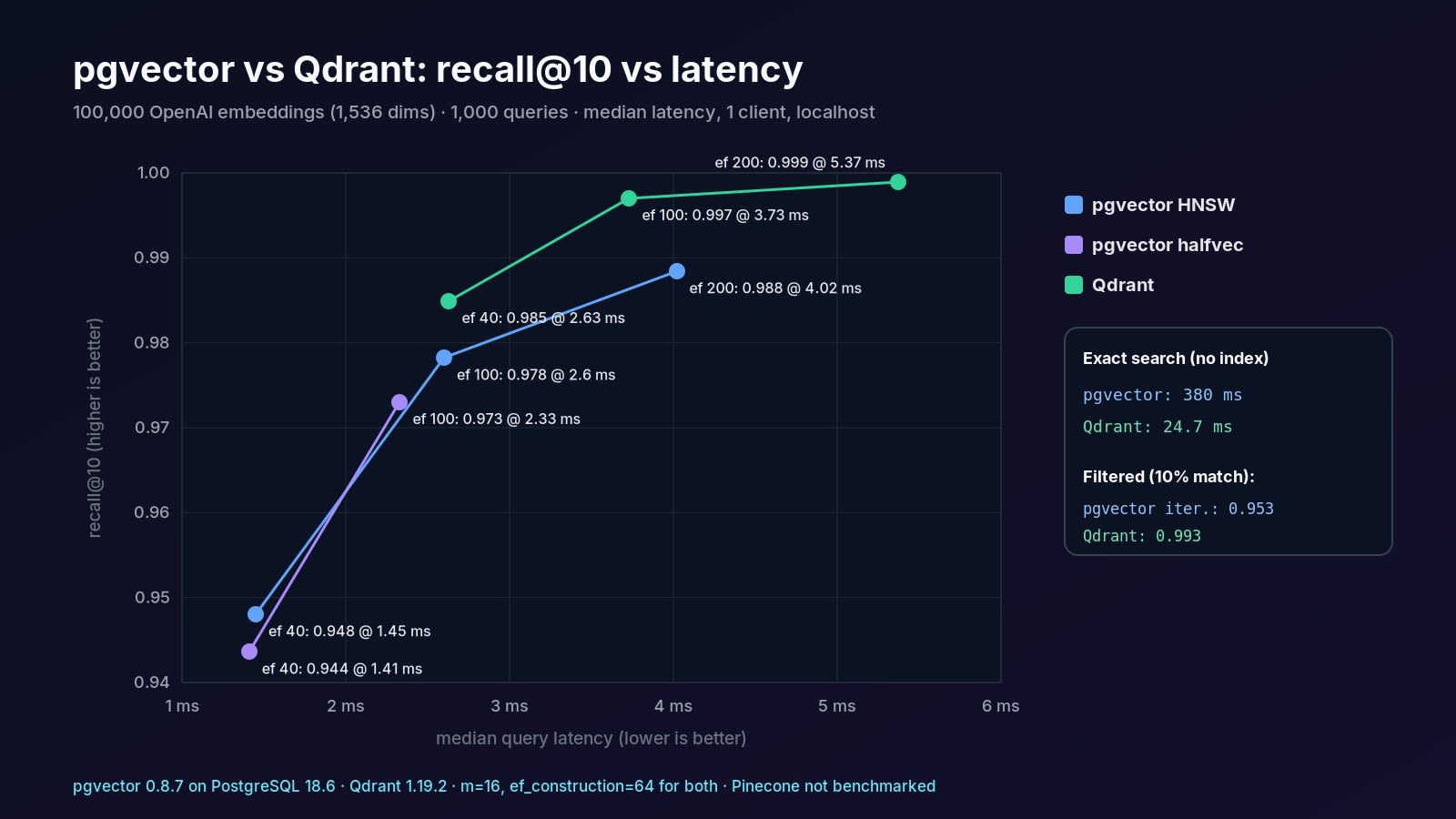
Why does Qdrant get higher recall at the same ef? It splits the collection into segments (4 here) and searches each one with that ef, so it explores more candidates in total. Compare the engines at equal recall, not equal settings.
How fast do they load and index?#
Qdrant indexed faster: 30.8 seconds from the first upload to a fully indexed collection, with the upload itself taking 20.2 s from one Python process. pgvector loaded the rows with COPY in 3.9 s, then needed 69.1 s to build the HNSW index with the default 2 parallel workers.
Use the halfvec trick in pgvector: indexing embedding::halfvec(1536) halved the index from 781 MB to 391 MB and cost about half a point of recall (0.973 against 0.978 at ef_search = 100). Query the index with the same cast:
CREATE INDEX ON documents
  USING hnsw ((embedding::halfvec(1536)) halfvec_cosine_ops);

SELECT id FROM documents
ORDER BY embedding::halfvec(1536) <=> $1::halfvec(1536)
LIMIT 10;
How does filtered vector search compare?#
Qdrant handled filters best. With a payload index on category, filtered top-10 queries returned 0.993 recall at 2.1 ms median. pgvector gave three very different results depending on the plan Postgres picked, so you need to know how its filtering works.
Why does pgvector return fewer rows with a filter?#
Because HNSW filters after the index scan. The README explains: "If a condition matches 10% of rows, with HNSW and the default hnsw.ef_search of 40, only 4 rows will match on average." I measured 3.92. Since pgvector 0.8.0, iterative index scans keep walking the graph until enough rows match.
-- once per session or per transaction (SET LOCAL)
SET hnsw.iterative_scan = relaxed_order;

SELECT id, content FROM documents
WHERE tenant_id = $1
ORDER BY embedding <=> $2
LIMIT 10;
Postgres often picks the exact plan by itself for a selective filter. In my test it used the category B-tree and sorted about 10,000 rows exactly: perfect recall, but 44 ms instead of about 3 ms. That is fine for one tenant with a few thousand chunks. For large tenants, check EXPLAIN and turn on iterative scans. If one filter dominates, consider a partial index or partitioning by tenant.
What does Pinecone offer that pgvector and Qdrant don't?#
Fully managed, serverless scaling with nothing to run. Reads and writes scale separately, storage lives in object storage, and you never tune ef or m. The trade-offs are documented:
- Eventual consistency. The known limitations page says "Pinecone is eventually consistent, so there can be a slight delay before upserted records are available to query."
- Operation limits. Per the operation limits: dense vectors up to 20,000 dimensions, 40 KB of filterable metadata per record, 1,000 records or 2 MB per upsert batch, and
top_kup to 10,000. - Plans. The object limits give the free Starter plan 2 GB of serverless storage and 5 indexes per project, all in AWS
us-east-1. Pinecone pricing lists the Standard plan at a $50/month minimum. - Network hop. Every query leaves your VPC. Expect your cloud region's round-trip time on top of search time. My localhost latencies are not comparable to Pinecone and I did not measure it.
When should I choose each one?#
Decide by what you already run and what dominates your workload. The pgvector default is strong for product teams. Move when you measure a reason, not before.

- Choose pgvector when your data lives in Postgres, you need joins, row-level security or transactions with your embeddings, and you have up to a few million vectors per index. Add pgvectorscale (StreamingDiskANN) if the index outgrows RAM.
- Choose Qdrant when search is the product: tens of millions of vectors, many filters, multi-vector or hybrid search, or quantization to cut memory. Its quantization guide says scalar quantization achieves "4x compression with minimal accuracy loss."
- Choose Pinecone when nobody on the team should run a database, traffic is spiky, and a usage bill plus eventual consistency are acceptable.
How do I move from pgvector to Qdrant later?#
Keep embeddings and IDs portable from day one. Use the same primary key in both systems, store the embedding model name and dimensions with each row, and write a re-sync job that streams rows by ID. Qdrant accepts integer or UUID point IDs, so a UUIDv7 primary key maps across directly.
Then run both side by side, compare recall on a fixed set of real queries, and switch reads before you stop writing to Postgres.
Common mistakes with vector search in production#
- Indexing 3,072-dimension vectors as
vector. HNSW onvectorstops at 2,000 dimensions. Usehalfvecor a smaller output dimension. - Forgetting iterative scans. Filtered HNSW queries in pgvector can silently return fewer than
LIMITrows. - Comparing engines at equal settings.
efmeans different work in different engines. Compare at equal recall. - Measuring recall on random vectors. Use real embeddings from your model. Random data hides graph quality.
- Creating Qdrant payload indexes after loading. The indexing docs say payload indexes should be created before ingesting data, so filter-aware HNSW edges get built.
- Ignoring re-embedding cost. Switching embedding models means re-embedding everything, whichever store you use.
If you want a working starting point, my open-source Next.js AI starter kit, Forgekit, ships RAG on pgvector. For self-hosting Postgres or Qdrant next to your app, see self-hosting Next.js with Coolify.
Key takeaways#
- With 100,000 OpenAI embeddings, pgvector 0.8.7 hit 0.948 recall@10 at 1.45 ms with defaults and 0.988 at 4.0 ms with ef_search 200.
- Qdrant 1.19.2 hit 0.985 recall at 2.6 ms, about 1.5x faster than pgvector at roughly equal recall.
- pgvector's HNSW filters after scanning: a 10% filter returned only 3.92 of 10 rows until iterative scans were enabled.
- Qdrant's payload index gave the best filtered search in my test: 0.993 recall at 2.1 ms.
- A halfvec HNSW index halved pgvector's index size (781 MB to 391 MB) for about half a point of recall.
- Pinecone is serverless and eventually consistent, supports 20,000-dimension vectors, and its Standard plan has a $50/month minimum.
- Start with pgvector if you already run Postgres; move to Qdrant or Pinecone when measurements show a need.
Questions
Share


